---
schema_version: "1"
id: d0656ee87fd59301a05da5e0b796703c70793da0274402a5a22313b77ad830cc
title: Schedule Clustering
collection: admin
version: current
locale: en-us
portal_url: https://docs.salesforce.com/admin/current/en-us/service/264-0-0/csi_schedule_clustering.md
canonical_url: https://help.salesforce.com/s/articleView?id=service.csi_schedule_clustering.htm&release=264.0.0&type=5
source_site: help.salesforce.com
content_type: documentation
content_hash: fe24d46f5cbd3b349be8b863d23b7b5f960503bc6c98dc46de8c7625aa24ed53
description: To ensure that the most up-to-date data is available by a particular time or to run a job during non-business hours, schedule the clustering transform.
products:
- Service Cloud
- Service Intelligence
release: "264"
---
# Schedule Clustering
To ensure that the most up-to-date data is available by a particular time or to run a job during non-business hours, schedule the clustering transform.
### Required Editions
Available in: Lightning Experience
Available in: Enterprise, Unlimited, and Developer Editions with Data 360 enabled and the Customer Signals Intelligence add-on
User Permissions Needed
To manage data transforms:
Data Cloud Architect
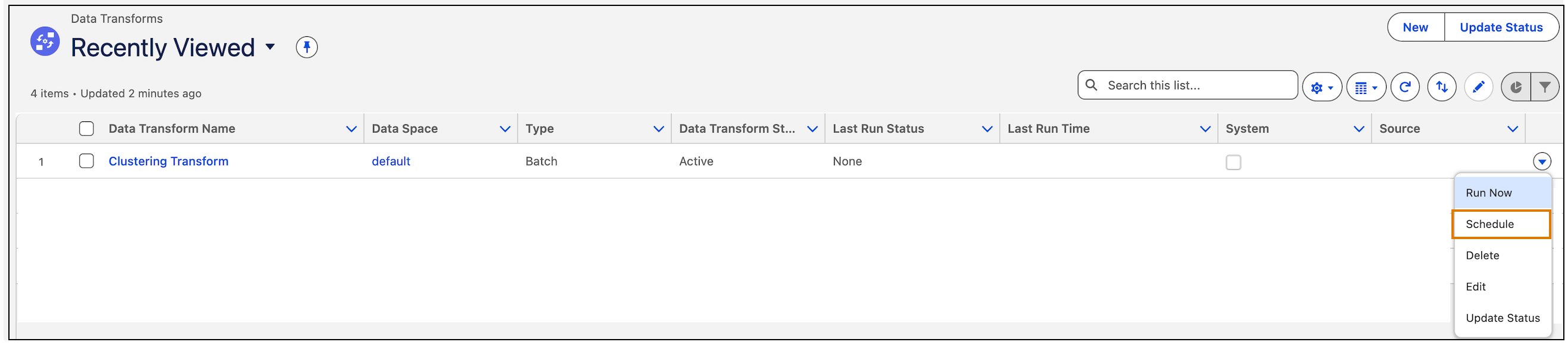
1. To schedule clustering, from Apps, open **Data Transforms**.
2. For Clustering Transform, click **Schedule**.
3. Enter details to schedule the transform. For more information on scheduling, see [Schedule a Batch Data Transform](https://help.salesforce.com/s/articleView?id=data.c360_a_batch_transform_schedule.htm&type=5&language=en_US).
4. Save your changes.