---
schema_version: "1"
id: 93653ecc0253f8800a272a2eb6dfe9d19d8d31febe2518379597e7f8d3e03e66
title: Enable Einstein Conversation Mining
collection: admin
version: current
locale: en-us
portal_url: https://docs.salesforce.com/admin/current/en-us/service/264-0-0/conversation_mining_setup.md
canonical_url: https://help.salesforce.com/s/articleView?id=service.conversation_mining_setup.htm&release=264.0.0&type=5
source_site: help.salesforce.com
content_type: documentation
content_hash: fde9649dbe6a0e7aff4e9ac6e6d3214e1046f2f7a1aeb9e78efe45dc524ebb24
description: Enable Einstein Conversation Mining in minutes.
products:
  - Service Cloud
  - Service Intelligence
release: "264"
---
# Enable Einstein Conversation Mining

Enable Einstein Conversation Mining in minutes.

### Required Editions

<table class="slds-table slds-table_bordered slds-max-medium-table_stacked slds-m-bottom_small edition"><colgroup><col></colgroup><tbody><tr class=""><td class="slds-cell-wrap" style="vertical-align:top;"><a href="https://help.salesforce.com/s/articleView?id=service.einstein_service_intro.htm&amp;language=en_US" target="_blank">View supported editions</a>.</td></tr></tbody></table>

<table class="slds-table slds-table_bordered slds-max-medium-table_stacked slds-m-bottom_small permission">
        <colgroup>
          <col style="width:50%">
          <col style="width:50%">
        </colgroup>
        <thead class="slds-text-title_caps ">
          <tr class="">
            <th scope="colgroup" class="slds-cell-wrap" colspan="2" style="text-align:center;vertical-align:top;" id="d43601e55">User Permissions Needed</th>
          </tr>
        </thead>
        <tbody>
          <tr class="">
            <td data-label="User Permissions Needed" class="slds-cell-wrap" style="vertical-align:top;" headers="d43601e55 ">To build and manage Einstein Conversation Mining reports:</td>

            <td class="slds-cell-wrap" style="vertical-align:top;" headers="d43601e55 ">
              <p>Customize Application</p>
              <p>OR</p>
              <p>Modify Metadata</p>
              <p>OR</p>
              <p style="margin-bottom:0;">Manage Bots</p>
            </td>

          </tr>
        </tbody>
      </table>

1. From Setup, in the Quick Find box, enter Einstein Conversation Mining, and then select **Einstein Conversation Mining**.
2. Turn on **Einstein Conversation Mining**.
3. (Optional) To get reports on your Enhanced Conversations data, turn on **Connect to Data Cloud**. When you turn on Data 360, your conversational data connects to Data 360 for your Einstein Conversation Mining reports. To verify that it’s ready for use, look for the Connected status.
    
    Your data can take up to 1 hour to process from Conversation Storage Service (CSS) to Data 360 before you can start building an Enhanced Conversations report. The Enhanced Conversations channel is available to admins who store their conversational data in Conversation Storage Service (CSS). Admins with conversational data stored on the Salesforce platform don’t have access to this channel.
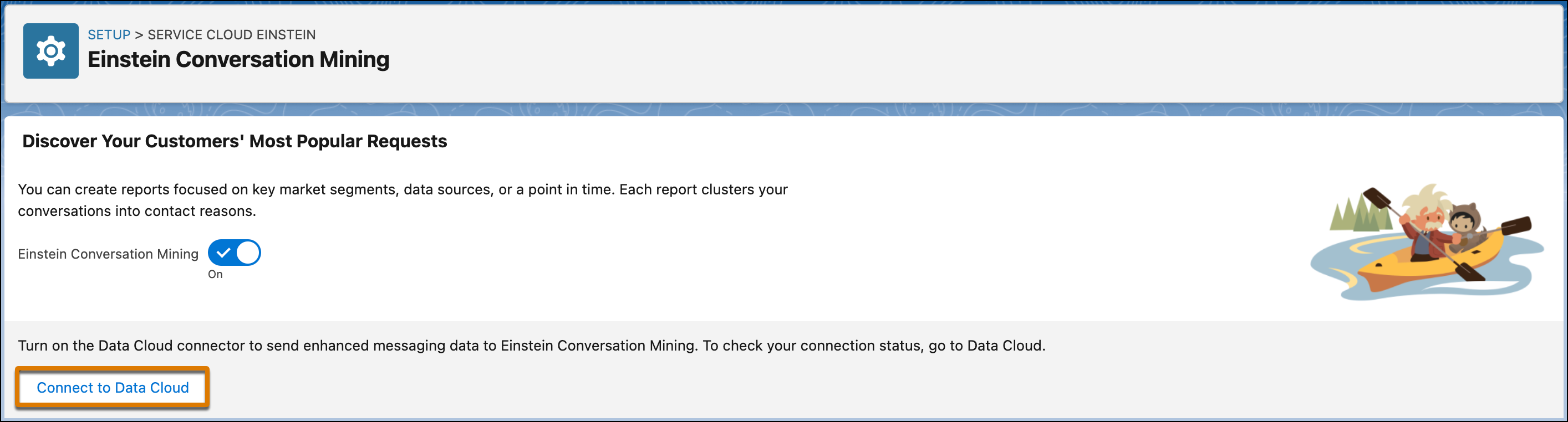
    
    ![Einstein Conversation Mining home page with a callout on Connect to Data Cloud.](https://sf-zdocs-cdn-prod.zoominsoftware.com/tdta-service-support_intelligence-264-0-0-production-enus/dcd06a7b-b5ab-448b-a767-4e2e90481508/support_intelligence/images/conversation_mining/einstein_conversation_mining.png)

![Note](https://sf-zdocs-cdn-prod.zoominsoftware.com/tdta-service-support_intelligence-264-0-0-production-enus/dcd06a7b-b5ab-448b-a767-4e2e90481508/images/icon_note.png)

Note

As of October 14, 2025, Data Cloud has been rebranded to Data 360. During this transition, you may see references to Data Cloud in our application and documentation. While the name is new, the functionality and content remains unchanged.