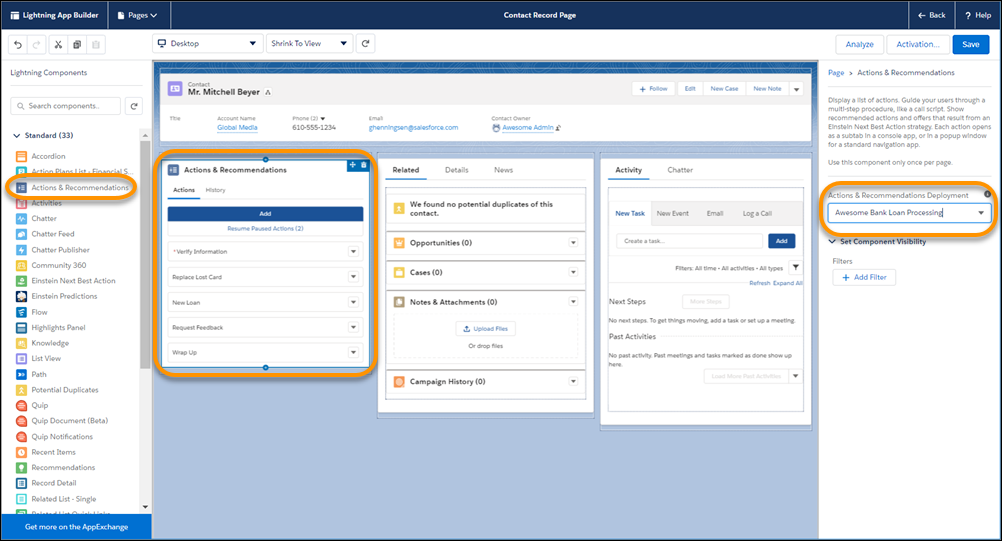
Add the component to your Lightning pages, and select a deployment.
Required Editions
| Available in: Lightning Experience |
|
Available in: Essentials, Professional, Enterprise, Performance, Unlimited, and Developer Editions Lightning console apps are available for an extra cost to users with Salesforce Platform user licenses for certain products. Some restrictions apply. For pricing details, contact your Salesforce account executive. |
| User Permissions Needed | |
|---|---|
| To create and save Lightning pages in Lightning App Builder: | Customize Application |
| To view Lightning pages in Lightning App Builder: | View Setup and Configuration |
| To view Actions & Recommendations deployments in component properties: | View Setup and Configuration |
- Edit a record page in Lightning App Builder.
-
Drag the Actions & Recommendations component to a location on the page.
For the Service Console app, we recommend adding the component to the left pinned sidebar.
 Note You can add the component to Lightning console and standard navigation pages for most objects. To learn about supported objects, refer to the Lightning Flow for Service Developer Guide (English only).
 -
In component properties, select a deployment.
 Tip We recommend that you configure and select a deployment. A deployment lets you specify the actions that users can start from the component when they click Add. Also, you can reuse a deployment on different pages.
 -
Save, and activate your page if necessary.