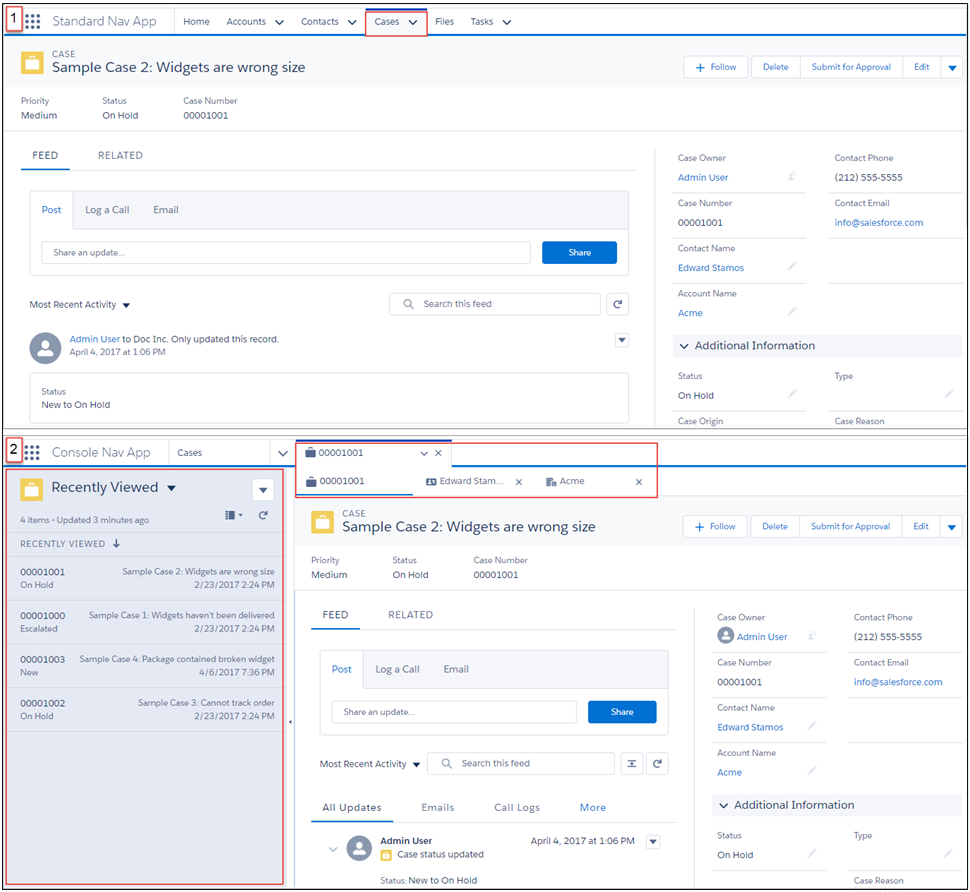
Apps with standard navigation let you open a single record at a time. However, apps
with console navigation let you open multiple records at a time, and related records open in
subtabs under the original record.
Required Editions
| Available in: Salesforce Classic and Lightning Experience |
|
Available in: Essentials, Professional,
Enterprise, Performance, Unlimited, and
Developer Editions
Lightning console apps are available for
an extra cost to users with Salesforce Platform user licenses for
certain products. Some restrictions apply. For pricing details,
contact your Salesforce account executive.
Lightning console
apps are available in the Essentials edition in Lightning Experience
only.
|
Here’s a look at how standard navigation apps (1) and console navigation apps (2) are
different.
In Lightning console apps, your app’s navigation rules determine how records are opened.
You can configure related records to open as workspace tabs, or as subtabs of a new
workspace tab. For example, you can have contact records open as a subtab of that
contact’s account.
With console apps, you can work with multiple records more efficiently. If you work in a
fast-paced environment, console apps are a great solution.