
Customize the welcome message that the Agentforce Service agent sends to customers during a proactive service interaction.
Required Editions
| Available in: Salesforce Classic and Lightning Experience |
| Available in: Available in Enterprise, Performance, Unlimited, and Developer Editions with Foundations or Agentforce 1 Editions. Access to some standard agent actions requires additional add-on licenses. |
| Available in: LWR and Aura |
| Available in: Enhanced Chat with the Einstein for Service, Einstein Platform, Community, Community Plus, or Agentforce for Service add-on |
- Make sure you’ve the Agentforce for Service or Einstein Platform add-on license.
- Make sure you’ve the ProactiveServicePlatformAccess and ProactiveServicePSL licenses provisioned.
- Make sure you’ve the ProactiveServicePlatformAccess and ProactiveServicePSL licenses provisioned.
- Make sure you’ve created the serviceAgentPrompt custom field on the Messaging Session object.
- Make sure you’ve mapped the serviceAgentPrompt variable in your Embedded Service Deployment.
You can make the welcome message dynamic by using context variables passed from the Service Campaign. By using the format {!$Context.serviceAgentPrompt} on the Agent detail page, the agent uses the prompt instructions defined in your campaign. To prevent the system from showing a raw variable name if the prompt is missing, add fallback logic to your Omni-Channel flow.
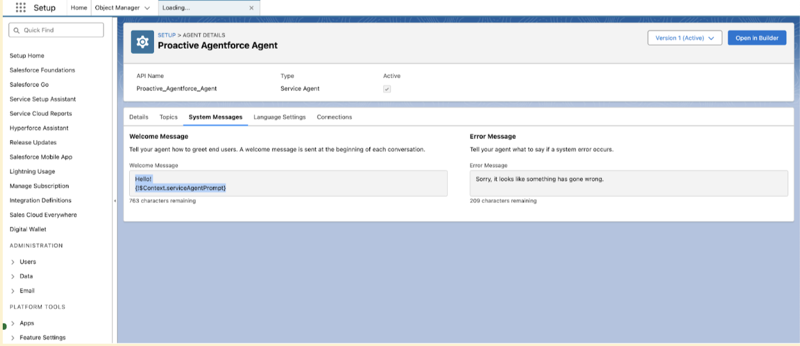
- From the Agentforce Service agent detail page, find the welcome message field.
-
Enter the dynamic variable
{!$Context.serviceAgentPrompt}so that the agent can run campaign-specific instructions. - Open your proactive Omni-Channel flow in Flow Builder.
- Create a Flow Formula element to handle empty variables.
-
Use the formula
IF(ISBLANK({!serviceAgentPrompt}), "I'm here to assist you with any
      queries you might have.", {!serviceAgentPrompt})
to provide a generic greeting if the campaign prompt is null.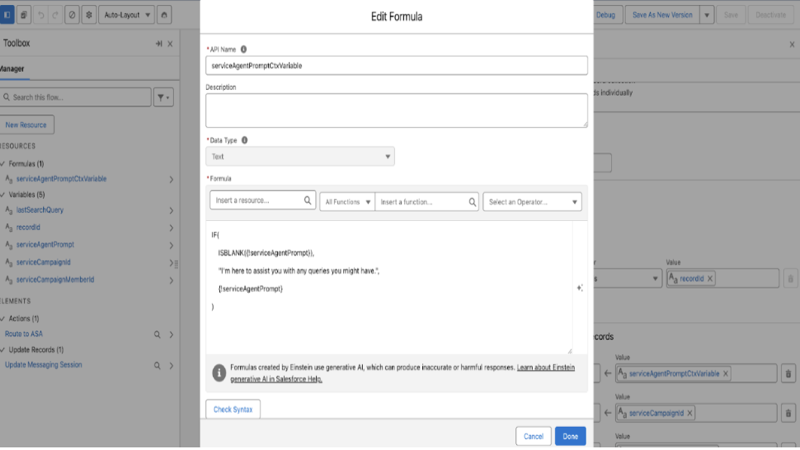
- Add an Update Records element before the routing action to set the MessagingSession.serviceAgentPrompt field using your new formula.
- Save and activate the flow to make sure the agent uses the updated welcome message logic.