
When Einstein Case Classification automatically saves predicted field values to a case, Einstein Case Routing can use your existing case routing logic to route the case to the right service rep. You need the Service Cloud Einstein add-on license to use Einstein Case Routing.
Required Editions
| View supported editions. |
| User Permissions Needed | |
|---|---|
| To build and manage Einstein Case Classification and Einstein Case Wrap-Up: |
View Setup AND Customize Application AND Manage Profiles and Permission Sets AND Edit on cases OR Modify All Data |
- From Setup, enter Einstein Classification in the Quick Find box, and then select Einstein Classification.
-
Under Settings, choose whether to run case assignment rules, run skills based routing, or both.
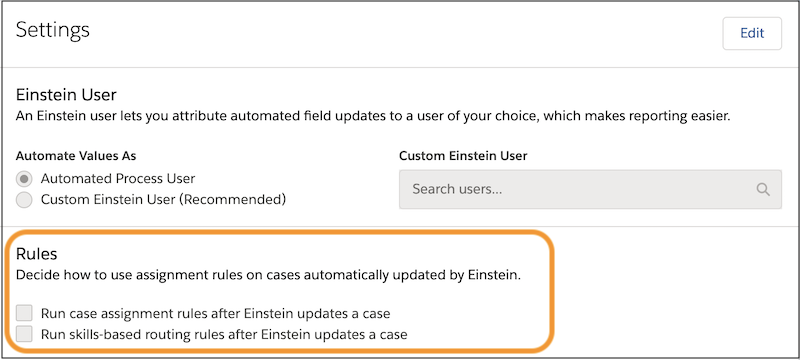 If your org uses both case assignment rules and skills-based routing rules, you can select both options. Make sure that the rules are mutually exclusive.
 Note If you elect to run case assignment or skills-based routing rules, but no rules are defined, the cases aren't routed. To learn how to define the rules, see Set Up Assignment Rules or Routing with Skills-Based Routing Rules.
If Automate Value is turned on for a field in your model, Einstein Case Classification automatically updates the case field when the prediction meets your confidence threshold. When a case is updated in these circumstances, Einstein Case Routing then runs the routing rules that you’ve selected on the Einstein Classification Setup page. If you don’t select a rule option, Einstein doesn’t route the case.

If you use any other logic for your queue-based or skills-based routing, or you have an external routing implementation, use platform events to subscribe to AIUpdateRecordEvent. After you get notified of Einstein’s changes through AIUpdateRecordEvent, rerun your routing logic.