
Use Einstein Classification Apps in the Service Console
Einstein Case Classification and Einstein Case Wrap-Up help you fill in fields on cases by recommending or selecting field values based on similar closed cases. Simply view, select, and save recommendations from the Lightning Service Console.
Required Editions
| View supported editions. |
| User Permissions Needed | |
|---|---|
| To view and act on Einstein Case Classification recommendations: | Einstein Case Classification User permission set |
| To view and act on Einstein Case Wrap-Up recommendations: | Einstein Case Wrap-Up User permission set |
View recommendations in Einstein Case Classification component, or the Einstein Case Wrap-Up component, in the Lightning Service Console. If you’re using Einstein Case Classification in Salesforce Classic, recommendations appear in the Case Classification sidebar.
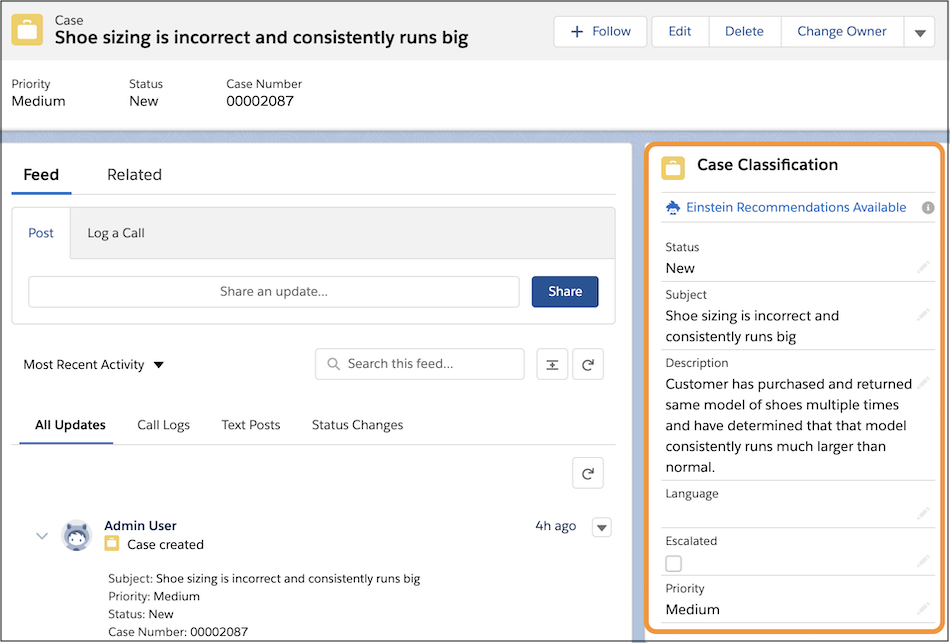
To view Einstein’s recommendations, refreshing the page is sometimes required.
For Case Classification, Einstein makes recommendations immediately after the case is created. To select Einstein’s predictions, click Einstein Recommendations Available. Fields with recommendations appear with a green dot, and the text at the top of the component changes to Einstein Recommendations Applied.
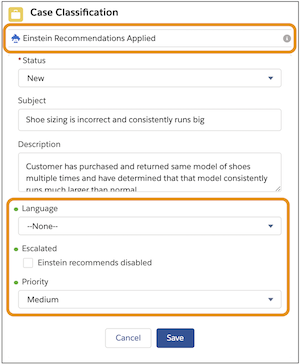
For Einstein Case Wrap-Up, chat service reps see recommendations on-demand or when the chat conversation ends. To see Einstein’s predictions, service reps click Get Einstein Recommendations in the Einstein Field Recommendations Lightning component. A green dot marks fields with predictions. For Case Wrap-Up, Einstein only considers information from LiveChatTranscripts and Case when making recommendations.
For Case Classification and Case Wrap-Up, recommendations are shown on:
- Checkboxes: Text next to the field says Einstein recommends disabled or Einstein recommends enabled.
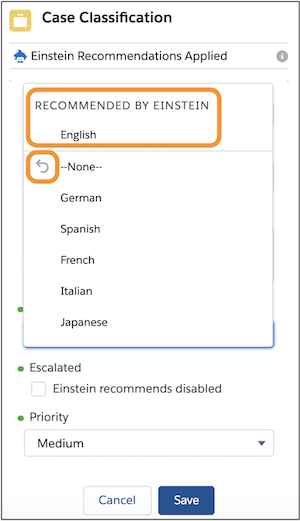
- Picklists and lookup fields: If the recommended value is selected, the word Best appears
next to the value. If not, click into the field to see which value Einstein recommends.
- The gray arrow shows the current value.
- The recommended value is shown with the text Recommended by Einstein. Up to three recommended values are shown, with the most likely value listed first.
After you review the recommendations, save your changes.