---
schema_version: "1"
id: d7b6fcd05c0a2a63bb5b1c1e5f4bbecac90d1be9e3b28840cd9a1edea6dcf8f9
title: Give Service Reps Access to Work Summaries
collection: admin
version: current
locale: en-us
portal_url: https://docs.salesforce.com/admin/current/en-us/service/264-0-0/cc_generative_ai_work_summaries_give_agents_access.md
canonical_url: https://help.salesforce.com/s/articleView?id=service.cc_generative_ai_work_summaries_give_agents_access.htm&release=264.0.0&type=5
source_site: help.salesforce.com
content_type: documentation
content_hash: 0e64385ef43e3875c95c8ad392284ed7155e846423403891daac324a134e2dc9
description: Give service reps access to Work Summaries by assigning them the correct permission sets.
products:
- Service Cloud
- Service Intelligence
release: "264"
---
# Give Service Reps Access to Work Summaries
Give service reps access to Work Summaries by assigning them the correct permission sets.
### Required Editions
To give service reps access to Einstein for Service Work Summaries:
Manage Profiles and Permission Sets
1. Select the service reps or profiles you want to use Work Summaries.
2. Assign your selected service reps the Work Summaries User permission set. The permission set is included with the Einstein for Service add-on license.
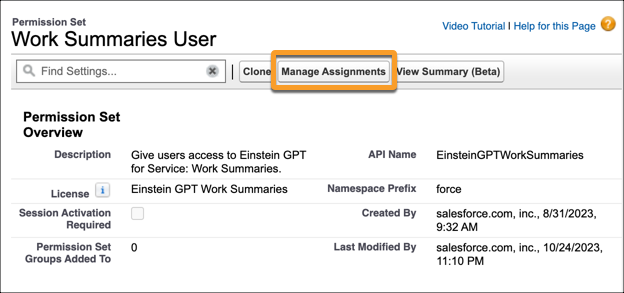
If Work Summaries is enabled, users with the Work Summaries User permission set get access to the Wrap Up component in the service console.
3. (Optional) To use Work Summaries with Service Email, assign your users the Execute Prompt Templates user permission.
4. (Optional) To use Work Summaries in agent, assign service reps the Use Einstein Copilot for Salesforce user permission and the Prompt Template user permission.