---
schema_version: "1"
id: 44d941825a2496136596296b998ca23803bd8c22b4aeaed0010f495029dc77e5
title: Add the Wrap Up Component to the Chat Transcript Page
collection: admin
version: current
locale: en-us
portal_url: https://docs.salesforce.com/admin/current/en-us/service/264-0-0/cc_generative_ai_add_summaries_component.md
canonical_url: https://help.salesforce.com/s/articleView?id=service.cc_generative_ai_add_summaries_component.htm&release=264.0.0&type=5
source_site: help.salesforce.com
content_type: documentation
content_hash: 17561770f30a4f1a839fb41860d45c7e76bddfdaa391bd80dd3c79bc968bd7ec
description: To show service reps summaries, add the Wrap Up component to the chat transcript page.
products:
- Service Cloud
- Service Intelligence
release: "264"
---
# Add the Wrap Up Component to the Chat Transcript Page
To show service reps summaries, add the Wrap Up component to the chat transcript page.
### Required Editions
To create and save Lightning pages in the Lightning App Builder:
Customize Application
1. From Setup, go to Object Manager.
2. Select the **Case** object, and then select **Buttons, Links, and Actions**.
3. Either select an existing update record quick action or create one.
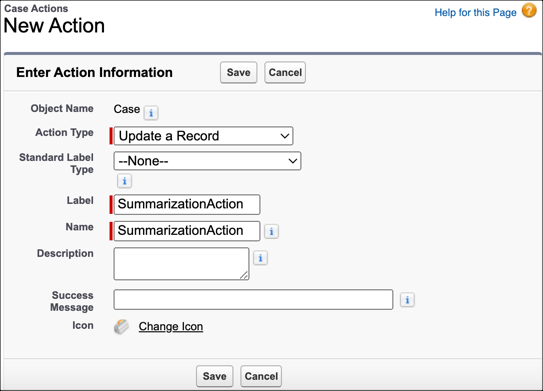
1. To create a quick action, select **New Action**. For action type select **Update a Record**. Enter a label and click **Save**. Under Case Fields, drag the mapped summary fields into the layout.
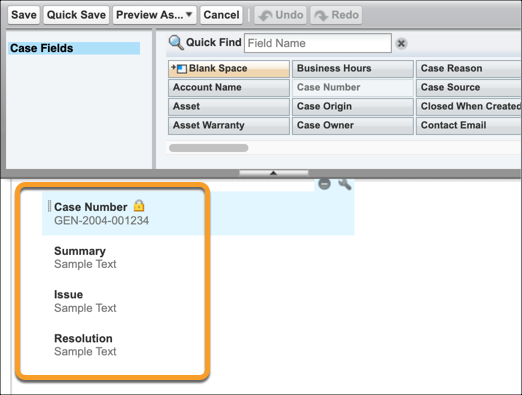
2. To use an existing update a record quick action, add the fields you selected for summary mapping. To add the summary fields from your existing Quick Action click **Edit Layout**. Under Case Fields, drag the mapped summary fields into the layout.
4. Click **Save**.
5. From Setup, go to Lightning App Builder.
6. For the Chat Transcript Record Page, click **Edit**.
7. From the standard components menu, drag the Einstein Field Recommendations component onto the Chat Transcript Record Page.
8. Select **Wrap Up** for the recommendation type, and select your update record quick action for the Update Action.
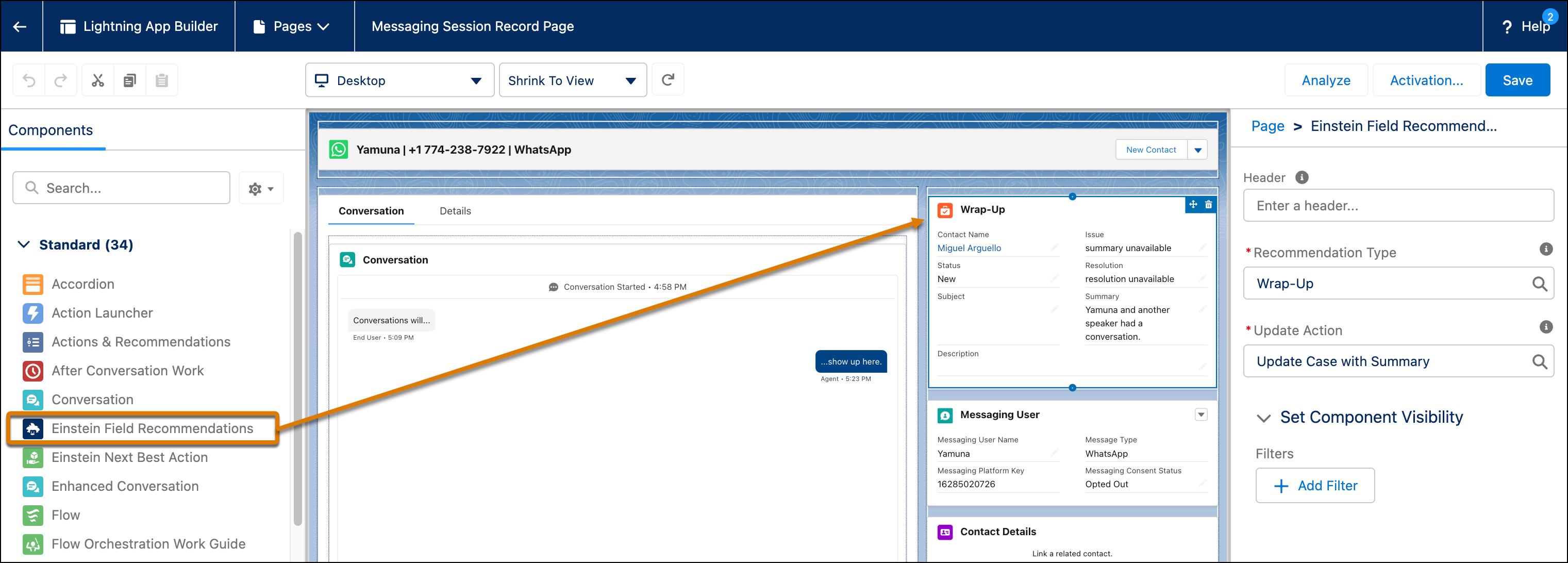

Note Use Case Wrap-Up and Work Summaries from the same component by customizing the update action layout. The update action’s layout determines which fields appear in the component.
9. Click **Save and Activate**.
#### See Also
- [Customize Lightning Apps with the Lightning Apps Builder](https://help.salesforce.com/s/articleView?id=platform.apps_lightning_customize.htm&type=5&language=en_US)