---
schema_version: "1"
id: 9509c3bd878618154f26147569bc2524f396adc453bd9b6b7d268a591bd22c3f
title: Find, Attach, and Email Articles with the Case Feed Articles Tool
collection: admin
version: current
locale: en-us
portal_url: https://docs.salesforce.com/admin/current/en-us/service/264-0-0/case_interaction_using_articles.md
canonical_url: https://help.salesforce.com/s/articleView?id=service.case_interaction_using_articles.htm&release=264.0.0&type=5
source_site: help.salesforce.com
content_type: documentation
content_hash: 536bbad32522cb5396c8b30359e20d543d2132d634bc9c0790d768ad8a56c0d4
description: Knowledge articles can help you solve cases more quickly by providing in-depth troubleshooting steps and other detailed information. Use the articles tool in Case Feed to search for articles relevant to the case you're working with, attach articles to the case, and email them to customers.
products:
- Service Cloud
release: "264"
---
# Find, Attach, and Email Articles with the Case Feed Articles Tool
Knowledge articles can help you solve cases more quickly by providing in-depth troubleshooting steps and other detailed information. Use the articles tool in Case Feed to search for articles relevant to the case you're working with, attach articles to the case, and email them to customers.
### Required Editions

Note Before you can use the articles tool, your administrator needs to set up and configure Salesforce Knowledge.
- Click  to open the articles tool.
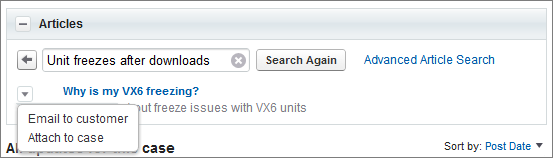
- By default, the tool shows articles with keywords or phrases similar to the subject and description of the case you're working with. If you don't see the article you want, type new terms in the search box and click **Search Again**, or click **Advanced Article Search** for more options.
- Click the title of an article to open it in a new window if you want to see more information about it than just the title and the summary.
- When you find the article you want, choose what you want to do with it:
- Select Email to customer to attach the article to a message as a PDF.
- Select Attach to case to include the article as a case attachment.