---
schema_version: "1"
id: 24f76092d4892db27f794040c285c63926edde8361bafc66cef9b5d83fb112e1
title: Transfer Bot Conversations
collection: admin
version: current
locale: en-us
portal_url: https://docs.salesforce.com/admin/current/en-us/service/264-0-0/bots_service_transfer_bot_conversations.md
canonical_url: https://help.salesforce.com/s/articleView?id=service.bots_service_transfer_bot_conversations.htm&release=264.0.0&type=5
source_site: help.salesforce.com
content_type: documentation
content_hash: 34d8c5e5a6d42fffb09574ad7b9aa2f95f4e1c80e5632d2f7554ecfd8df06450
description: Einstein Bots are team players. They’re great at passing conversations to the team member that is most likely to solve a customer issue. Whether you program your bot to transfer to a service rep or to another bot, the following steps show you the best way to set up bot conversation transfers.
products:
- Service Cloud
- Service Intelligence
release: "264"
---
# Transfer Bot Conversations
Einstein Bots are team players. They’re great at passing conversations to the team member that is most likely to solve a customer issue. Whether you program your bot to transfer to a service rep or to another bot, the following steps show you the best way to set up bot conversation transfers.
### Required Editions

Note Starting August 17, 2026, Einstein Bots is in Maintenance Mode. Existing Einstein Bots continue to be supported and can be used after August 17, 2026. However, no new features or enhancements will be added, and we recommend using Agentforce for new AI agent implementations. See [Upgrade Bots to Service Agent](https://help.salesforce.com/s/articleView?id=service.bots_service_asa_create.htm&type=5&language=en_US) and [Learn about Agentforce](https://trailhead.salesforce.com/content/learn/trails/design-and-implement-ai-agents-with-agentforce).
User Permissions Needed
To build and manage Einstein Bots:
Customize Application
OR
Modify Metadata
OR
Manage Bots
## Use the Transfer to Agent System Dialog to Transfer Conversations
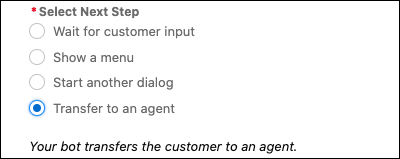
You can transfer conversations to a service rep in the queue attached to the deployment or connection defined on the Overview page by pointing to the Transfer to Agent dialog. Select **Transfer to an agent** in the Next Step section. If you set any other transfer dialog steps, the bot ignores the Next Step and uses the dialog step instructions instead.
## Use a Dialog Rule Step to Transfer Conversations
You can also use Rule dialog steps to transfer conversations to a specific queue or to another bot.
- **[Transfer Bot Conversations to a Queue](https://help.salesforce.com/s/articleView?id=service.bots_service_transfer_queue.htm&release=264.0.0&type=5)**
You can route bot conversations to a queue of service reps by using Rule dialog steps. And you can help customers who initiate a transfer when service reps are offline with the No Available Agents dialog.
- **[Transfer Bot Conversations to Another Bot](https://help.salesforce.com/s/articleView?id=service.bots_service_transfer_bot.htm&release=264.0.0&type=5)**
Create custom solutions in your org by adopting a multi-bot strategy. Use dialog Rule steps to transfer bot conversations to another bot.
- **[Use Skills-Based Routing to Transfer Bot Conversations](https://help.salesforce.com/s/articleView?id=service.bots_service_transfer_skills.htm&release=264.0.0&type=5)**
Increase customer satisfaction with skills-based service rep routing and bots. Now you can route work items to service reps that can best serve customer needs based on skills like language or technical expertise. Skills-based routing makes bots the first point of customer contact. The bot identifies the required skills then transfers the customer to the next available service rep that matches their needs. Skills-based routing works the same across all channels.