---
schema_version: "1"
id: 897cae030ed604185c94c4c60bb6b8ba996fb0169115130752b207f0b25b7ed0
title: Transfer Bot Conversations to Another Bot
collection: admin
version: current
locale: en-us
portal_url: https://docs.salesforce.com/admin/current/en-us/service/264-0-0/bots_service_transfer_bot.md
canonical_url: https://help.salesforce.com/s/articleView?id=service.bots_service_transfer_bot.htm&release=264.0.0&type=5
source_site: help.salesforce.com
content_type: documentation
content_hash: cc42b3b02f0618701737d12df1568032d3f2c79013464fd31612ca0d30212450
description: Create custom solutions in your org by adopting a multi-bot strategy. Use dialog Rule steps to transfer bot conversations to another bot.
products:
- Service Cloud
- Service Intelligence
release: "264"
---
# Transfer Bot Conversations to Another Bot
Create custom solutions in your org by adopting a multi-bot strategy. Use dialog Rule steps to transfer bot conversations to another bot.
### Required Editions
Bot-to-bot transfers between standard and enhanced bots aren’t supported. Both bots in a bot-to-bot transfer must be of the same type.
When you create multiple bots, you can transfer conversations from one bot to another. Some businesses build bots based on function. For example, one bot starts the interaction and then transfers the conversation to a sales or service bot based on customer input. Other businesses build bots based on customer location or language. When a bot transfers the conversation to another bot, each conversation is counted as a unique conversation.
To transfer a conversation to another bot, start with two bots: the source bot and the destination bot. Create an ID variable to define the destination bot. Then use a Rule dialog step with the same bot ID variable to initiate the transfer.
1. Create an ID variable to define the destination bot.
1. In the Bot Builder menu, select **Variables**.
2. Click **New**.
3. For the Data Type, select **ID**. For the SObject Type, select **Bot**.
4. Click **Save**.
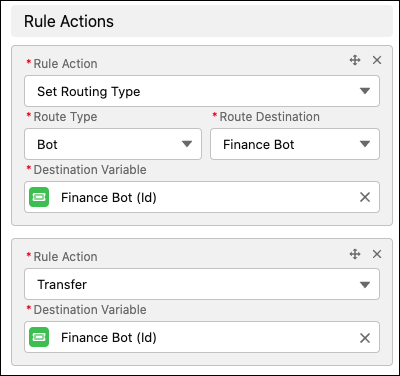
2. From the Dialog Component Library, drag the **Set Routing Type** onto the canvas.
3. In the Step Properties panel, in the Route Type field, select **Bot**. In the Route Source field, select the destination bot. In the Destination Variable field, select the ID variable that you created.
4. Click **Add Rule Action**.
5. In the Rule Action field, select **Transfer**. In the Destination Variable field, select the ID variable set in the previous step.
6. Save the dialog.