
Learn about how the bot kicks off the conversation and guides the end user towards common tasks.
Required Editions
| View supported editions. |
The Welcome dialog is included with all Salesforce bots—it greets your end users that are interacting with the bot. In the Intro Template’s Welcome dialog, you see the customized greeting, which includes the bot name you specified in the Guided Setup Flow:
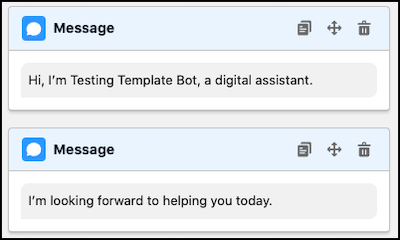
But even before the greeting, there’s an action dialog step that calls the flow Einstein Bots: Get Customer Context. This action is designed to get context from the bot’s pre-chat form or the Messaging Session object, so the bot can have a more personalized conversation with your users.
The Get Customer Context action gets user details, such as name, email, phone number, and company name. It also pre-creates a case, contact, or lead, if it exists. The bot then uses this information to skip irrelevant questions and dialogs. For example, if the user already provided their name, the bot skips the questions asking for first name and last name.
The bot automatically moves from the Welcome dialog to the Main Menu dialog. Here, you see a rule action that calls the Clear Memory dialog:
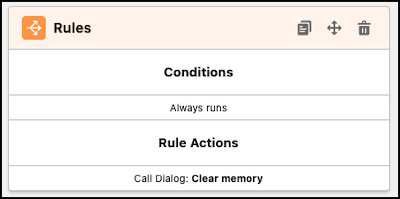
This dialog clears the values of certain variables to allow users to go back through the bot again. Read more about it in Conversation Loopback.