
Build a bot to capture end user information and create a lead record.
Required Editions
| View supported editions. |
The Connect with Sales dialog skill, the group of dialogs used to complete a task, helps your prospects and existing customers contact your sales representatives. Using the bot, customers can learn more about your products and services, schedule a demo, ask for a quote, and more. The first thing you notice in the Connect with Sales dialog is that there are two rules up front. These rules are designed to handle scenarios where the user created a lead already. The bot avoids creating a duplicate lead and instead informs the user that a Lead was created already.
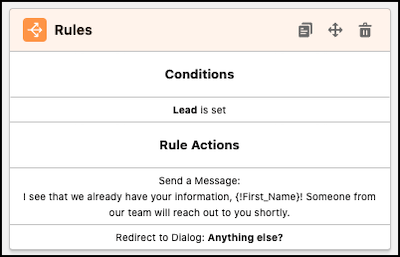
The first rule covers the scenario where a Lead was created by a pre-chat form. In this scenario, the bot displays a message indicating that it already has lead information, and it routes the user to the Anything else? dialog so they go back to the Main Menu.
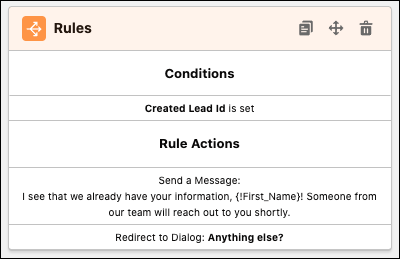
The second rule covers the scenario where the user has been through the Connect with Sales dialog skill one time and created a lead. The bot follows the same behavior as the previous scenario, displaying a message and routing to the Anything else? dialog.
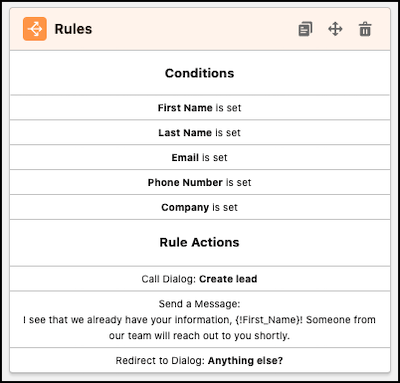
Next, the bot handles the scenario where the information necessary to create a lead has been entered, but a lead hasn’t yet been created. In this case, the bot still creates a lead, but it skips the step where it asks the user questions to gather information.
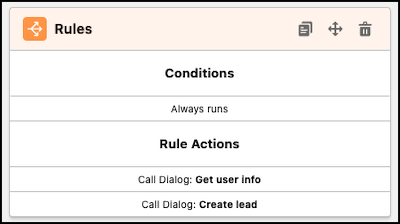
The next rule follows a common pattern across dialogs. The bot first calls the Get user info dialog to gather information, and then it calls the Create Lead dialog to create a lead record using that information.
Create Lead
Next, let’s look at the Create Lead dialog, where you see an action that invokes a flow to create a lead record:
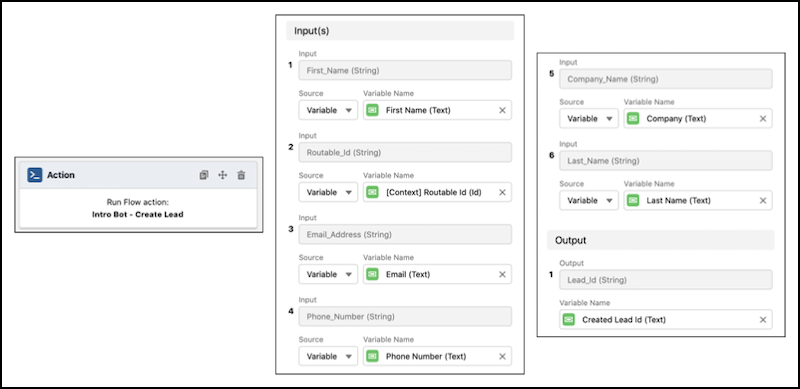
The Routable Id is also included as an input so that the lead can be attached to the appropriate chat transcript.

The flow also outputs the ID of the created lead record, which is mapped to a bot variable. This way, the bot knows that a lead has been created, so that it can avoid creating a lead again.