Use one dialog to capture end user information. Build a dialog one time and share across multiple dialogs.
Required Editions
| View supported editions. |
The Gather info from user dialog is a shared dialog called from the Connect with Sales and Report an Issue dialog groups to collect key information from the user. The dialog collects the user’s information by asking the user a series of questions and filling variables with the responses.

Both system entities and custom entities are used to capture user responses. The system text entity is used to capture a broad range of inputs and not overly restrict responses. It’s used to capture the user’s first name, last name, and company:
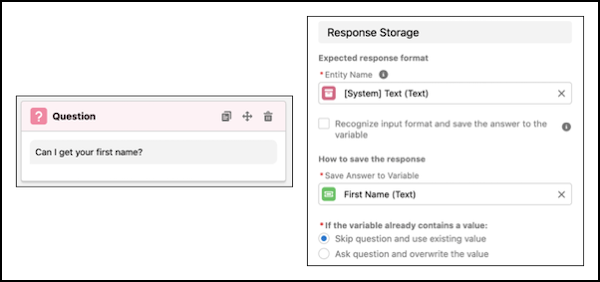
Custom entities help validate user responses before they’re stored in bot variables. If bot variables are used to populate data fields, entities help maintain data quality within Salesforce. For example, a custom email entity is used to capture the user’s email address:
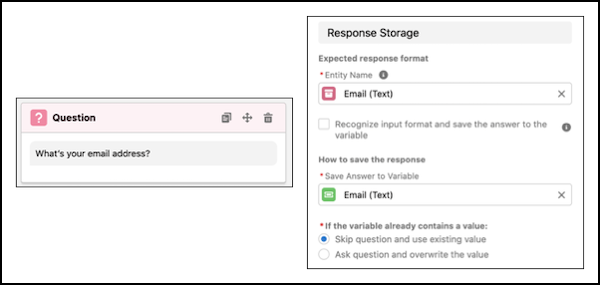
If we take a closer look at the email entity, we see that it uses a regular expression (RegEx) to recognize an email format with an @ sign and domain name:

If the user enters a phrase that doesn’t match the RegEx format, the bot becomes confused and moves to the Confused dialog.
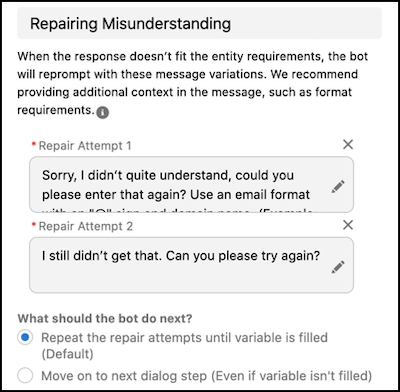
With custom entities, it’s a good idea to use Conversation Repair to correct an input before defaulting to the Confused dialog. Conversation repair can provide the user with specific guidance on how to format a response: