
Take a deep dive into the Einstein Bot Intro Template. You can learn how to create great bots by reviewing building tips, conversation design strategies, and bot flow. Create a bot to connect with sales, report an issue, and check the status of an issue or an order.
Required Editions
| View supported editions. |
Salesforce designed the Intro Template to get you up and running with Einstein Bots as quickly as possible. This guide provides examples of common sales and service automation scenarios that you can customize for your business. After you deploy the bot through the Guided Setup Flow, you’re dropped into the Bot Builder experience with a pre-configured Bot. If the process seems daunting, don’t worry—that’s what this guide is for. In what follows, we help you understand what’s happening behind the scenes in the bot configuration.
The Intro Template is deployed through an all-new Guided Setup experience where you can customize the bot’s name, language, and use cases. Using this guided experience, you can learn how to deploy a bot in a Salesforce organization in 1 minute. To create a bot using the Intro Template, read more at Create a New Intro Template Bot.
The Intro Template covers common major use cases for your customers. Each use case appears in the bot’s Main Menu, which directs users down different paths in the bot depending on what they select. Also included with the Intro Template are pre-built flows that handle the creation and look-up of Salesforce records. For example, the Connect with Sales dialog skill includes a flow to create a lead, and the Report an Issue dialog skill includes a flow to create a case. In addition, we added dialogs that are crucial to creating a complete bot, such as transferring to a service rep or gracefully handling the end of the conversation.
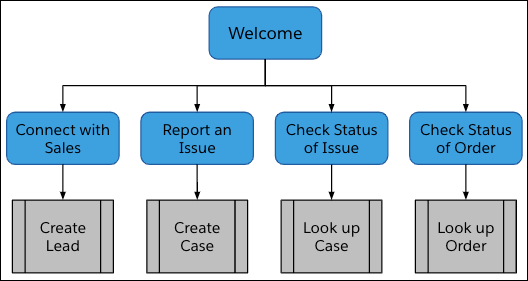
The goal of this document is to explain each component and the best practices we used to implement each component. We hope you use these methods to elevate your own bots, so your customers have a great experience every time. These small steps take good bots and turn them into great bots.
- Create an Intro Template Bot
The intro template includes popular Salesforce actions such as creating a case, creating a lead, looking up an order, or adding a case comment to an existing case. To kickstart conversational experiences, the template also includes intent data. - Learn About the Template Bot: Welcome Dialogs
Learn about how the bot kicks off the conversation and guides the end user towards common tasks. - Learn About the Template Bot: Connect with Sales
Build a bot to capture end user information and create a lead record. - Learn About the Template Bot: Report an Issue
You can create cases from bot conversations using the Report an issue dialog and the Create Case dialog. - Learn About the Template Bot: Check Issue Status
The bot uses dialogs such as Check the status of an existing issue, Case look up, Case found, Case not found, and Add case comment to check the status of a case and add a case comment. - Learn About the Template Bot: Check Order Status
Automate order lookups using the Check the status of an order, Order look up, Order found, and Order not found dialogs. - Learn About the Template Bot: Gather Info from User
Use one dialog to capture end user information. Build a dialog one time and share across multiple dialogs. - Learn About the Template Bot: Supporting Dialogs
Bots work best with supporting dialogs that help create a great customer experience. Learn about key dialogs: Agent Transfer, Anything else, Clear Memory, Confused, and End Chat. Explore intent data used for exact matching.