---
schema_version: "1"
id: 0dea7abced79615d1945314ec745eee3a1ac64fd47b315fc5d143a8992794d12
title: Set Up a Dialog Question Step with Text Responses
collection: admin
version: current
locale: en-us
portal_url: https://docs.salesforce.com/admin/current/en-us/service/264-0-0/bots_service_setup_dialog_question_text.md
canonical_url: https://help.salesforce.com/s/articleView?id=service.bots_service_setup_dialog_question_text.htm&release=264.0.0&type=5
source_site: help.salesforce.com
content_type: documentation
content_hash: a6ab96092b14b3d520a6457a37ab1c31293e7bd3f21276f7a305e333693b083f
description: Use a Question step to gather information from your customers using text input.
products:
- Service Cloud
- Service Intelligence
release: "264"
---
# Set Up a Dialog Question Step with Text Responses
Use a Question step to gather information from your customers using text input.
### Required Editions
Capturing text from your customer is a great way to hear exactly what they need. To gather information from your customer, your bot must know which entity to search for in the customer input to find the information (for example, date, location, and money). The bot also must know which variable to use to store it.
To act on this data, the bot must save only the relevant data, and not the rest of the unstructured text within the full message. To gather this input correctly, bots use Named Entity Recognition (NER) to extract only the relevant data that is expected, and save that to a specified variable. If the bot has trouble recognizing that expected entity, use Conversation Repair to provide extra context or information to help your customer clarify their input.
1. From the Dialog Component Library, drag the **Static** Question step onto the canvas.
2. In the Step Properties panel, enter the question from your bot to the customer in the Question to Ask field.
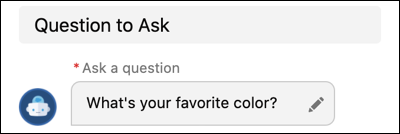

Note You can call standard fields in standard objects using the {!FieldName} format found in Object Manager. For custom fields, use the Field Name and include \_\_c at the end: {!CustomField\_\_c}. To call a specific record, use {!Record.Field}.
To call an item in a list variable, use FieldName\[X\], with X referring to the location of the item in the list. Einstein Bots uses a zero-based index with list variables, you can call the first item of the list using FieldName\[0\].
3. Skip the Choices to Display section. When you set up a question with text responses, the Bot Builder ignores any selection in the Choices to Display section.
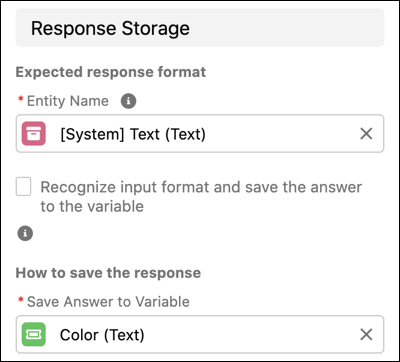
4. Under Response Storage, select or create an entity that matches the information you want to gather and a variable to store the answer.
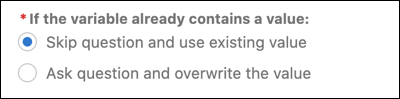
5. Tell the bot what to do if the variable already contains a value. Conversations that use the same dialog multiple times can retain the value and skip the question (for example, asking for the customer’s name). Or, the bot can ask the question and override the value (for example, looking up multiple orders).
6. Optionally, if you capture structured data and want to help the customer understand the format the bot requires, you can add Conversation Repair to the Question dialog step. Under Repairing Misunderstandings, include one or two repair attempts, and add details to help your customer follow your regex or other pattern.
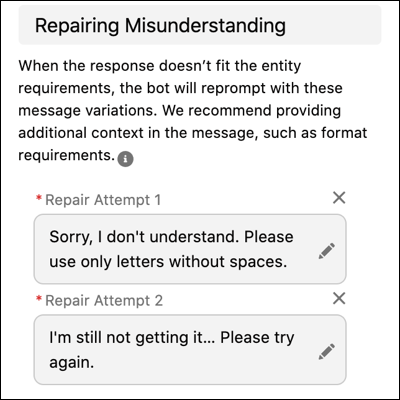
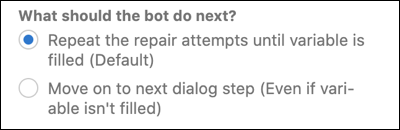
After the bot makes these attempts, the bot must know how to resolve the issue. Define whether the bot asks the customer the repair attempts until they provide the information in the right format, or move on to the next dialog step. Moving on to the next dialog step after the initial attempts leaves the variable empty.
7. Save the dialog.

Note If the customer input doesn't match the entity used to collect the question's answer, the bot attempts intent prediction. If the customer’s input leads to an intent identification, it will redirect to the new dialog. If the bot isn’t able to identify an intent, it executes Conversation Repair. If the bot is unable to identify an intent and Conversation Repair isn’t set, the bot calls the “Confused” dialog.