
The Bot Overview Page defines important bot settings such as channels, profiles, and logging conversations. Get acquainted with the page to customize your bot.
Required Editions
| View supported editions. |
| User Permissions Needed | |
|---|---|
| To build and manage Einstein Bots: |
Customize Application OR Modify Metadata OR Manage Bots |

Note Starting August 17, 2026, Einstein Bots is in Maintenance
Mode. Existing Einstein Bots continue to be supported and can be used after August 17, 2026.
However, no new features or enhancements will be added, and we recommend using Agentforce
for new AI agent implementations. See Upgrade Bots to Service Agent
and Learn about
Agentforce.
Each bot includes a Bot Overview page, which defines all settings for the bot. You can update the name and language of your bot, add channels, or define settings such as logging conversations. Any changes made on this page affect your entire bot.
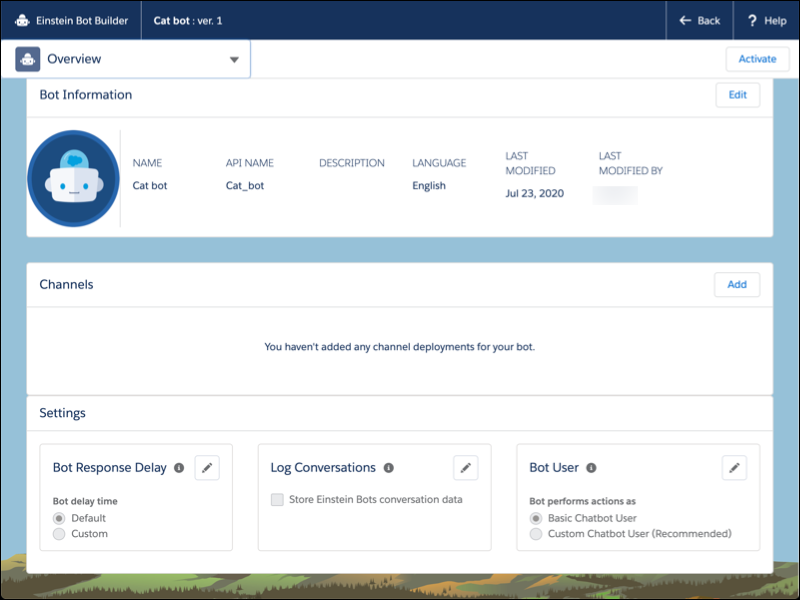
- From the Einstein Bot setup page, click the name of your bot to launch the Bot Builder.
- To access the Bot Overview page, select the Overview menu.
- View and Edit Your Bot’s Name and Description
When you create a new bot, you give it a name and an optional description that’s not visible to customers. These details can be changed. - Add a Custom Bot User
Expand a bot’s capabilities with a Custom Chatbot User. By default, each bot is assigned to the Basic Chatbot User. If you want a bot to use features or objects that require additional permissions, assign it to a custom user. - Log Conversations in Bot Event Logs
Use the Log Conversations setting to store conversation data from the Chat Transcript and Messaging Session objects in event logs. Then dig into bot sessions to troubleshoot your bot. - Define Languages for Your Einstein Bot
Your global customers expect your bots to understand their native language. To know what your customers are saying, your bots must know how a language works. Bots use natural language understanding (NLU) and named entity recognition (NER) to understand language and local details such as dates, currency, or number formatting. Einstein Bots that use a specific language can better understand the customer and route them to the correct dialog.