
The Model Management page shows metrics on the quality of your bot’s intent model and individual intent details. Use the information to fine-tune intents and improve how well your bot understands your customers.
Required Editions
| View supported editions. |
| User Permissions Needed | |
|---|---|
| To build and manage Einstein Bots: |
Customize Application OR Modify Metadata OR Manage Bots |

Your bot is only as good as the data that you feed it. To ensure Bot quality, we recommend visiting the Model Management menu often. Our models rate intents based on an F1 Score, which is a statistical term that shows how accurate the model is at predicting correctly.
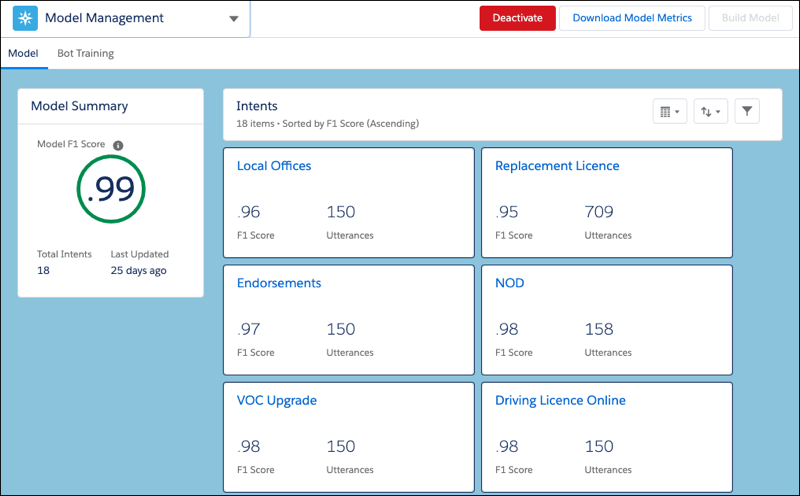
The F1 score is defined from 0 through 1, with 1 being the highest possible score. The higher your intent’s F1 score, the more likely that the bot predicts correctly every time it has a conversation. F1 scores combine two metrics:
- Precision—the number of correct positive results divided by the number of total positive results
- Recall—the number of positive results divided by the number of total expected results
To improve your intent’s F1 score, we provided recommendations on the Model Management Page.
- From the Bot Builder menu, click Model Management.
-
To view intent model metrics, display the Model tab.
-
To view the recommendations, click an intent name.
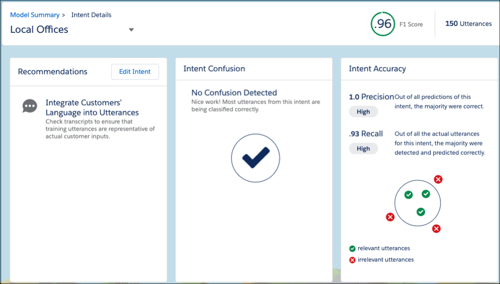
Adding utterances and clarifying intents are great ways to improve F1 scores. It’s also important to frequently integrate new customer data from conversation transcripts to keep the bot current. A minimum of 20 utterances is required to build the model, but more utterances make the model more accurate.
-
To act on the recommendations provided, click Edit Intent to go
to the intent details for that dialog.
To visualize the accuracy of your intent model, you can use the Einstein Intent Assessor AppExchange tool.
- To view model performance in other languages, click Download Model Metrics. Bots with multiple languages have both aggregated metrics and language-specific metrics.
- Test Multiple Intent Predictions
Evaluate how accurately your bot predicts intents by testing multiple utterances in bulk instead of one at a time. This method helps assess intent accuracy and identify gaps in intent configuration. Bulk testing helps identify misclassified utterances and assess overall model performance by using prediction metrics. Previously, testing utterances required manual, one-by-one validation. Bulk testing streamlines the process by analyzing large datasets and returning a consolidated prediction summary.