---
schema_version: "1"
id: 9e8821004415fc71461d79cace8295a48eef1597bef4a845102f3cd02ab678df
title: Log Conversations in Bot Event Logs
collection: admin
version: current
locale: en-us
portal_url: https://docs.salesforce.com/admin/current/en-us/service/264-0-0/bots_service_log_conversations.md
canonical_url: https://help.salesforce.com/s/articleView?id=service.bots_service_log_conversations.htm&release=264.0.0&type=5
source_site: help.salesforce.com
content_type: documentation
content_hash: db0926dabb9f19c6862f2aa0f603a8eee717e771f8d734a556ed0b2fda6cf3d8
description: Use the Log Conversations setting to store conversation data from the Chat Transcript and Messaging Session objects in event logs. Then dig into bot sessions to troubleshoot your bot.
products:
- Service Cloud
- Service Intelligence
release: "264"
---
# Log Conversations in Bot Event Logs
Use the Log Conversations setting to store conversation data from the Chat Transcript and Messaging Session objects in event logs. Then dig into bot sessions to troubleshoot your bot.
### Required Editions
Bot event logs allow you to review all bot conversation activity in one place. View the event logs for a bot in the Performance area of the Bot Builder. When the Log Conversations setting is enabled, you can click any Session ID to drill down and view customer input alongside bot messages and events. When the Log Conversations setting is disabled, Message, Input, and Output values are replaced with `[logSensitiveData not allowed]`.
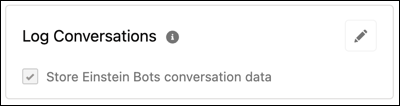
When you create a bot, the Log Conversations setting is disabled by default. You can edit the Log Conversations setting for a bot on the Bot Overview page.
1. From the Bot Builder menu, select **Overview**.
2. In the Settings section, to edit the Log Conversations panel, click .
3. Select or deselect **Store Einstein Bots conversation data**.
4. To save your changes, click .
The Log Conversations setting applies to Einstein Bot event logs only. Conversation data from Chat and Messaging sessions is stored based on the default settings for each channel your bot is connected to.
#### See Also
- [Troubleshoot Your Bot](https://help.salesforce.com/s/articleView?id=service.bots_service_events_log.htm&release=264.0.0&type=5 "Bots are an integrated product—they include Bot features, input from Chat and Messaging channels, and they work together with Apex and Flows. A great way to get started is to learn how to use the Event Logs to troubleshoot.")