---
schema_version: "1"
id: fc1c66fe26e222aed1184cc4430437d9ae84da56bc94a78cd88fb44559c01b87
title: Set or Update a Bot Primary Language
collection: admin
version: current
locale: en-us
portal_url: https://docs.salesforce.com/admin/current/en-us/service/264-0-0/bots_service_language.md
canonical_url: https://help.salesforce.com/s/articleView?id=service.bots_service_language.htm&release=264.0.0&type=5
source_site: help.salesforce.com
content_type: documentation
content_hash: 66c72d96ec7420247264a87500f1d900f5884c3202e5eb2494722630763fbea7
description: Every Einstein Bot requires a primary language to be able to understand your end users. Defining a bot primary language helps with natural language processing (NLP) and named entity recognition (NER).
products:
  - Service Cloud
  - Service Intelligence
release: "264"
---
# Set or Update a Bot Primary Language

Every Einstein Bot requires a primary language to be able to understand your end users. Defining a bot primary language helps with natural language processing (NLP) and named entity recognition (NER).

### Required Editions

<table class="slds-table slds-table_bordered slds-max-medium-table_stacked slds-m-bottom_small edition"><colgroup><col></colgroup><tbody><tr class=""><td class="slds-cell-wrap" style="vertical-align:top;"><a href="https://help.salesforce.com/s/articleView?id=service.einstein_service_intro.htm&amp;language=en_US" target="_blank">View supported editions</a>.</td></tr></tbody></table>

<table class="slds-table slds-table_bordered slds-max-medium-table_stacked slds-m-bottom_small permission">
        <colgroup>
          <col style="width:50%">
          <col style="width:50%">
        </colgroup>
        <thead class="slds-text-title_caps ">
          <tr class="">
            <th scope="colgroup" class="slds-cell-wrap" colspan="2" style="text-align:center;vertical-align:top;" id="d69544e57">User Permissions Needed</th>
          </tr>
        </thead>
        <tbody>
          <tr class="">
            <td data-label="User Permissions Needed" class="slds-cell-wrap" style="vertical-align:top;" headers="d69544e57 ">To build and manage Einstein Bots:</td>

            <td class="slds-cell-wrap" style="vertical-align:top;" headers="d69544e57 ">
              <p>Customize Application</p>
              <p>OR</p>
              <p>Modify Metadata</p>
              <p>OR</p>
              <p style="margin-bottom:0;">Manage Bots</p>
            </td>

          </tr>
        </tbody>
      </table>

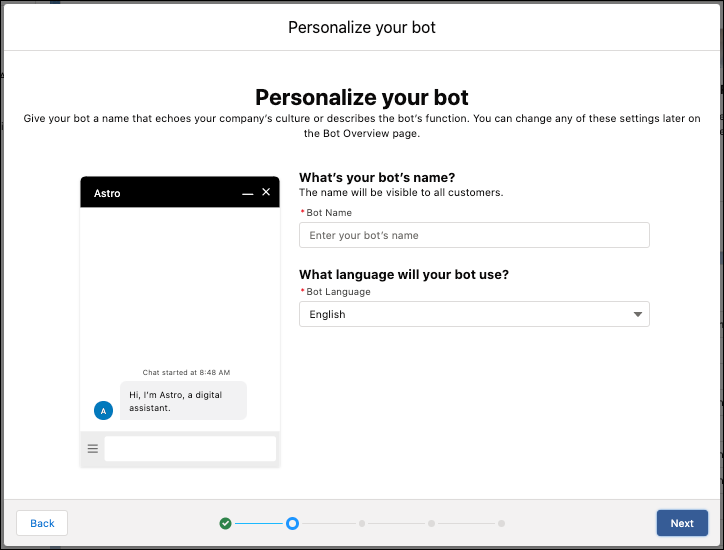
To set a primary language for the bot:

1. From setup, enter Einstein Bots in the Quick Find to select Einstein Bots.
2. Click **New**.
3. Select the type of bot to build. Click **Next**.
4. Select the bot's default language.
5. Click **Next** and complete the setup steps.
    
    ![The Einstein Bot Setup with a required field for Language.](https://sf-zdocs-cdn-prod.zoominsoftware.com/tdta-service-support_intelligence-264-0-0-production-enus/dcd06a7b-b5ab-448b-a767-4e2e90481508/support_intelligence/images/bots/bots_service_language_setup.png)

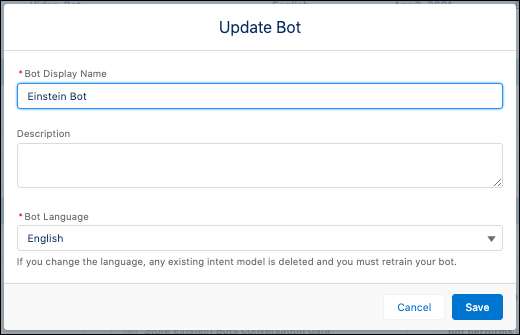
To set the language outside of the Setup Wizard, edit the Bot Overview section of the Overview menu.
![Editing the language on an existing bot through the Bot Overview page.](https://sf-zdocs-cdn-prod.zoominsoftware.com/tdta-service-support_intelligence-264-0-0-production-enus/dcd06a7b-b5ab-448b-a767-4e2e90481508/support_intelligence/images/bots/bots_service_language_update.png)

![Note](https://sf-zdocs-cdn-prod.zoominsoftware.com/tdta-service-support_intelligence-264-0-0-production-enus/dcd06a7b-b5ab-448b-a767-4e2e90481508/images/icon_note.png)

Note If secondary languages are added to this bot, you can’t update the primary language.