---
schema_version: "1"
id: b49f5da9f43b27a61cd1475d5ed03bfb9773ce2a53bd4666a16a97dd7c1e28d5
title: Share Your Intent Model Externally (Beta)
collection: admin
version: current
locale: en-us
portal_url: https://docs.salesforce.com/admin/current/en-us/service/264-0-0/bots_service_external_sharing.md
canonical_url: https://help.salesforce.com/s/articleView?id=service.bots_service_external_sharing.htm&release=264.0.0&type=5
source_site: help.salesforce.com
content_type: documentation
content_hash: 2e4a8eb745d49ac46128b7b57a407d70679c389724d6c9af76425ae574712c03
description: You can easily share your intent model with external Einstein.ai orgs. Use shared models to classify intent on other external datasets.
products:
- Service Cloud
- Service Intelligence
release: "264"
---
# Share Your Intent Model Externally (Beta)
You can easily share your intent model with external Einstein.ai orgs. Use shared models to classify intent on other external datasets.
### Required Editions
To share your intent model with another org, you need the destination Einstein.ai org ID. Models can only be shared with external Einstein.ai orgs and must have an org ID obtained through signup at [Einstein Platform Services](https://api.einstein.ai/signup). To move an intent model from sandbox to production, move the intent data by using an intent set, and then rebuild the model in the destination org. Learn more at [Import Intent Data to an Einstein Intent Set](https://help.salesforce.com/s/articleView?id=service.bots_service_intent_import_set.htm&release=264.0.0&type=5 "You can use Einstein Intent Sets to move utterances and entities between Salesforce orgs.").

Note Any use of this beta feature is subject to the Beta Services terms at [Agreements and Terms](https://www.salesforce.com/company/legal/agreements.jsp).
To share with an external org:
1. In the Bot Builder menu, click **Model Management**.
2. Click the **Model Sharing** tab.
3. Enter a valid Einstein.ai Org ID that you want to share the model to (the destination ID) and click **Share Model**.
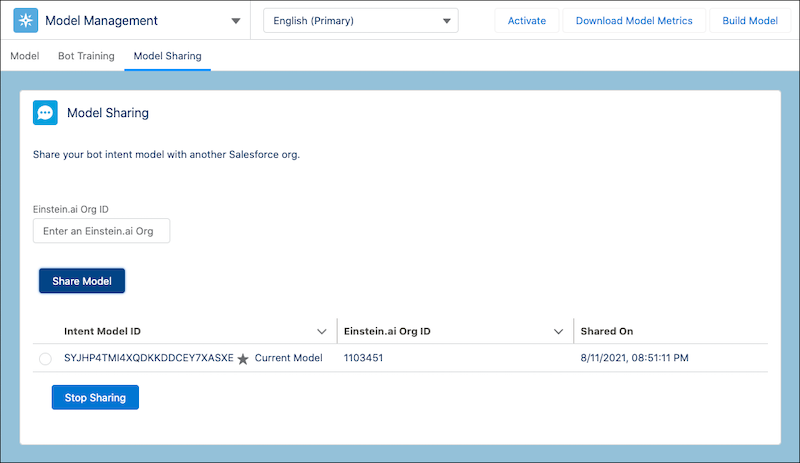
To remove sharing, select the shared model and click **Stop Sharing**.