---
schema_version: "1"
id: cde884bb709b6f244919de3da214b1315f0ac81f3b303c8048386c334783ae9e
title: Add an External Service Action
collection: admin
version: current
locale: en-us
portal_url: https://docs.salesforce.com/admin/current/en-us/service/264-0-0/bots_service_external_services.md
canonical_url: https://help.salesforce.com/s/articleView?id=service.bots_service_external_services.htm&release=264.0.0&type=5
source_site: help.salesforce.com
content_type: documentation
content_hash: 1222821fd91aabd0e5def6f9b1da4762378e59517bb62fd95959f192bd67ae59
description: Add an action from a registered external service in Bot Builder to allow your bot to send and receive data between Salesforce and external API providers. Deliver personalized customer experiences without writing a single line of code.
products:
- Service Cloud
- Service Intelligence
release: "264"
---
# Add an External Service Action
Add an action from a registered external service in Bot Builder to allow your bot to send and receive data between Salesforce and external API providers. Deliver personalized customer experiences without writing a single line of code.
### Required Editions
Before you begin, make sure that the external service you want to integrate with your dialog is registered in your Salesforce org. If not, register the external service. To register an external service, you must have the Customize Application user permission.
1. From the Dialog Component Library, drag the **External Service** Action step onto the canvas.
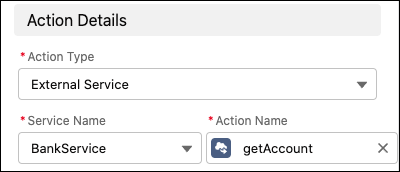
2. In the Step Properties panel, select the name of the external service associated with your desired action, and then select the action.
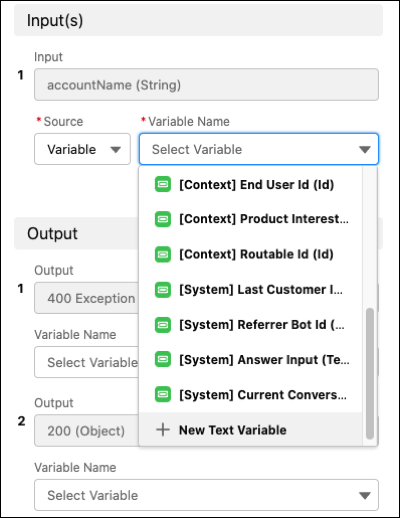
3. Specify input and output variables.
These variables are supported:
- Text
- Number
- Boolean
- Object
- Date
- DateTime
- Currency
- Id
- A single-level list (in other words, a collection of variables of the same type, such as a list of text values)
Bot Builder doesn’t support map inputs or nested lists (in other words, lists of lists).
4. Save the dialog.
When an external service action is used in a bot dialog, you can’t edit the settings for the associated service or delete the service from your Salesforce org—even when a bot is inactive. To edit or delete an external service, confirm that it’s not included in any bot dialogs. If you try to edit or delete a service that’s used in a bot dialog, you receive an error message and your changes aren’t saved.
#### See Also
- [What’s a Variable?](https://help.salesforce.com/s/articleView?id=service.bots_service_whats_a_variable.htm&release=264.0.0&type=5 "A variable is a container that stores a specific piece of data collected from the customer or output from Salesforce. Since variables are containers of information, they can be used within dialog actions as both inputs and outputs and can be inserted as part of the text in messages.")
- [_Trailhead_: External Services](https://help.salesforce.com/s/articleView?id=platform.external_services.htm&type=5&language=en_US)