---
schema_version: "1"
id: f127d35ab7a78afc4dd0c79fd81e12cfde745bbe4620367f3c6ed214058aa113
title: Ask a Question with Static Options with an Enhanced Bot
collection: admin
version: current
locale: en-us
portal_url: https://docs.salesforce.com/admin/current/en-us/service/264-0-0/bots_service_enhanced_question_static.md
canonical_url: https://help.salesforce.com/s/articleView?id=service.bots_service_enhanced_question_static.htm&release=264.0.0&type=5
source_site: help.salesforce.com
content_type: documentation
content_hash: 9cc7b7385de4d9c89d28b6b9ded05c8f5bf4920014460e458c28f9b7837fb8ff
description: Create a question with static options messaging component to quickly gather customer information. For example, create a question that asks customers to select a reason for reaching out to the bot. Then present your customers with predefined options in rich messaging formats that can include custom text, images, and buttons. For a plain text experience, use the non-messaging component Dynamic Question dialog step with enhanced and standard bots.
products:
- Service Cloud
- Service Intelligence
release: "264"
---
# Ask a Question with Static Options with an Enhanced Bot
Create a question with static options messaging component to quickly gather customer information. For example, create a question that asks customers to select a reason for reaching out to the bot. Then present your customers with predefined options in rich messaging formats that can include custom text, images, and buttons. For a plain text experience, use the non-messaging component Dynamic Question dialog step with enhanced and standard bots.
### Required Editions
Support for messaging components varies by channel.
1. From the Messaging Component page in Setup, [create a question with static options](https://help.salesforce.com/s/articleView?id=service.messaging_components_static_options.htm&language=en_US).
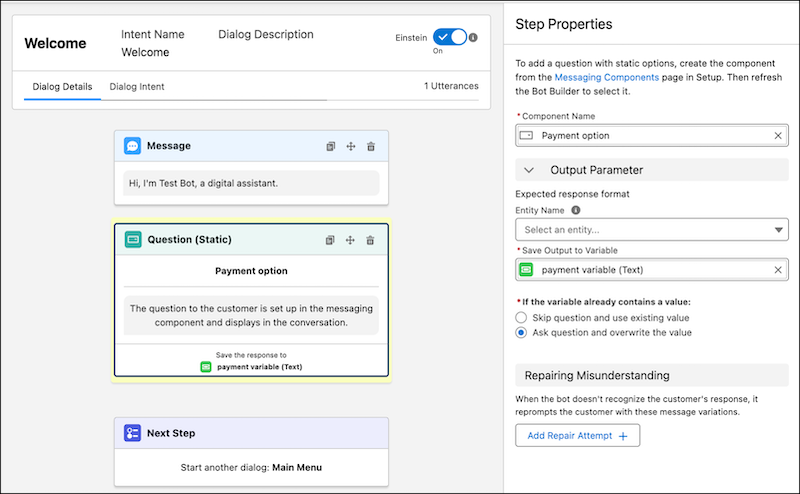
When you set up a question with static options, you create a question to the customer. The question text isn’t visible in the Bot Builder, but you don’t need to add a separate dialog step to send it. In the bot conversation, the question text is sent to the customer when they reach the dialog step that references your component.
2. Go to the Bot Builder. Click **Dialogs**, and then select the dialog that you want to add the question with static options to.
3. From the Dialog Component Library, drag the **Question (Static)** dialog step onto the canvas.
4. Optionally, select an entity in the **Entity Name** field if you want the customer’s response validated against an entity.
5. In the Step Properties panel, enter the name of your messaging component to search for and select it. If you don’t see your component, refresh the builder and try again.
6. Select or create a variable to store the customer’s response.
7. Tell the bot what to do if the variable already contains a value. The bot can keep the original value and skip the question, or the bot can ask the question and override the original value.
8. Optionally, add repair attempts to prompt the customer to try again if the bot doesn’t recognize their response. In the Repairing Misunderstanding section, include one or two repair attempts.
After the bot makes these attempts, tell the bot how to resolve the issue. Specify whether the bot repeats the repair attempts until the customer selects a valid choice or moves on to the next dialog step without filling the variable.
9. Save your changes.
#### See Also
- [Set Up a Dialog Question Step with Static Choice Responses](https://help.salesforce.com/s/articleView?id=service.bots_service_setup_dialog_question.htm&release=264.0.0&type=5 "Use a Static Question step to offer predefined options that let your customers answer questions quickly.")
- [Compare Messaging Channel Capabilities](https://help.salesforce.com/s/articleView?id=service.livemessage_managed_package_lex_differences.htm&language=en_US)
- [Considerations for Messaging Components](https://help.salesforce.com/s/articleView?id=service.messaging_components_considerations.htm&language=en_US)
- [Considerations for Messaging Components in Enhanced Bots](https://help.salesforce.com/s/articleView?id=service.bots_service_enhanced_considerations.htm&release=264.0.0&type=5 "Carefully review these considerations before setting up Enhanced Bots.")