---
schema_version: "1"
id: 87457f59f50df27eb49dde30d5cbfc5eb96040bbb5a67ea62758711aa3577b89
title: Connect a Standard Bot to Channels
collection: admin
version: current
locale: en-us
portal_url: https://docs.salesforce.com/admin/current/en-us/service/264-0-0/bots_service_deploy_to_channels.md
canonical_url: https://help.salesforce.com/s/articleView?id=service.bots_service_deploy_to_channels.htm&release=264.0.0&type=5
source_site: help.salesforce.com
content_type: documentation
content_hash: 37b7a1c9412501aee4118b6eb1e93c4809aabb391644ab08abdabacc77945dad
description: Einstein Bots can connect to many different end points, expanding the ways that you can deliver bots to your customers. Use the Connections section to view and add standard channels to your bot, or to connect standard and enhanced bots to the Einstein Bots API. To manage routing for enhanced bots, use Omni-Channel flows.
products:
- Service Cloud
- Service Intelligence
release: "264"
---
# Connect a Standard Bot to Channels
Einstein Bots can connect to many different end points, expanding the ways that you can deliver bots to your customers. Use the Connections section to view and add standard channels to your bot, or to connect standard and enhanced bots to the Einstein Bots API. To manage routing for enhanced bots, use Omni-Channel flows.
### Required Editions

Note Starting August 17, 2026, Einstein Bots is in Maintenance Mode. Existing Einstein Bots continue to be supported and can be used after August 17, 2026. However, no new features or enhancements will be added, and we recommend using Agentforce for new AI agent implementations. See [Upgrade Bots to Service Agent](https://help.salesforce.com/s/articleView?id=service.bots_service_asa_create.htm&type=5&language=en_US) and [Learn about Agentforce](https://trailhead.salesforce.com/content/learn/trails/design-and-implement-ai-agents-with-agentforce).

Note In orgs created in Summer ‘23 and later, Salesforce automatically enables enhanced Omni-Channel routing. Enhanced Omni-Channel routing doesn’t support standard bots or channels. If enhanced Omni-Channel routing is enabled for your org, we recommend [cloning your standard bots as enhanced bots](https://help.salesforce.com/s/articleView?id=service.bots_service_enhanced_create_clone.htm&release=264.0.0&type=5 "Clone a standard bot as an enhanced bot to upgrade your existing conversation designs with rich content and more flexible routing."). But if you still want to use standard bots, you can switch to standard Omni-Channel routing.
Einstein Bots Standard Channel Specifications:
- Standard bots support standard channels such as Chat (In-App and Web) and Messaging (SMS, Facebook Messenger, and WhatsApp channels only). Standard bots don’t support enhanced channels.
- Chat:
- The Utterance field on the UtteranceSuggestion object is available for encryption with Shield Platform Encryption. This field includes customer suggestions to add to the Intent Model, and contains data when admins select **Store Einstein Bots conversation data** on the Bot Overview page. This field only supports case-insensitive deterministic encryption. To encrypt this field, check **Encrypt** on the Encrypt Field page in Setup. Learn more about Shield Platform Encryption at [How Shield Platform Encryption Works](https://help.salesforce.com/s/articleView?id=xcloud.security_pe_concepts.htm&type=5&language=en_US).
- Einstein Bots doesn’t support menus and quick replies in custom Chat windows.
- Einstein Bots in Chat channels are now HIPAA and SOC2 compliant. Beta and Pilot features aren’t compliant. Learn more at [Learn About Einstein Bots Compliance](https://help.salesforce.com/s/articleView?id=service.bots_service_compliance.htm&release=264.0.0&type=5 "Bots are compliant with The Health Insurance Portability and Accountability Act (HIPAA), so customers in the healthcare industry can have secure conversations over Chat. Bots now exceed data confidentiality and privacy standards set by the Service Organization Controls reports (SOC 2), and they’re compliant with International Organization for Standardization (ISO) standards. Learn about how the bot infrastructure creates a secure environment with established processes and controls built around security, availability, and confidentiality of customer data.").
- Messaging:
- Before the Spring ’21 release, the bot sent a “We’re transferring you to an agent” message before transferring to a service rep. This message has been removed, and admins can configure the Error Handler system dialog to manage transfers. Learn more about the Error Handler at [Understanding System Bot Dialogs](https://help.salesforce.com/s/articleView?id=service.bots_service_system_bot_dialog.htm&release=264.0.0&type=5 "Einstein Bots are built for conversation. To make setup a breeze, some of the most common dialogs are included with each new bot. These dialogs allow you to quickly transfer conversations to a service rep, or gracefully end a chat. You can customize each message to your company’s voice and tone.").
- Bots with multiple outbound messages in the same dialog are combined into one message.
- Bots using Messaging channels don’t use the Bot Response Delay between messages.
- Facebook Messenger: Facebook Messenger allows for third-party bots to be connected to Facebook, which can pass information to Salesforce. To connect your third-party bot, customers must get approval from Facebook for their page to access version 2 of Facebook’s Handover Protocol. After it’s approved, developers must send a `pass_thread_control` webhook event and your org must be in a standby state to hear it. More information about the Facebook Handover Protocol is on the [Facebook Developer portal](https://developers.facebook.com/docs/messenger-platform/handover-protocol/). Salesforce doesn’t support third-party bot integration.
- In SMS channels, multiple outbound bot messages are combined into one message up to 960 characters. To learn more about character limits, see [Considerations for Long Code Messaging Channels](https://help.salesforce.com/s/articleView?id=service.messaging_text_message_considerations.htm&type=5&language=en_US).
- In WhatsApp conversations, users must select options from the most recent menu presented by the bot. Selecting options from earlier menus or sending unrelated messages can interrupt the dialog flow and prevent the conversation from progressing.
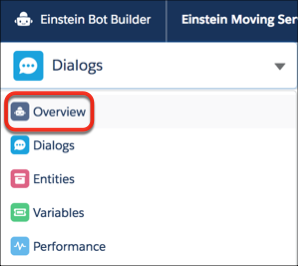
1. From the Bot Builder menu, click **Overview**.
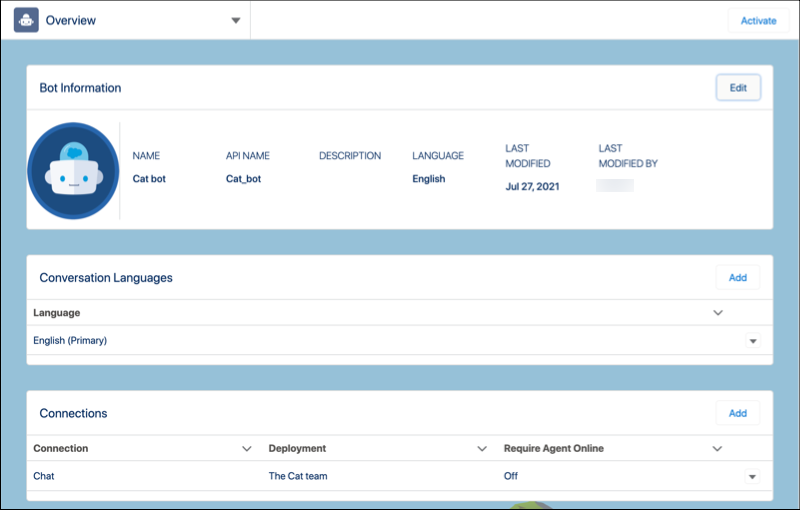
2. In the Connections section, click **Add**.
3. Select the channel and search for the deployment for your bot.
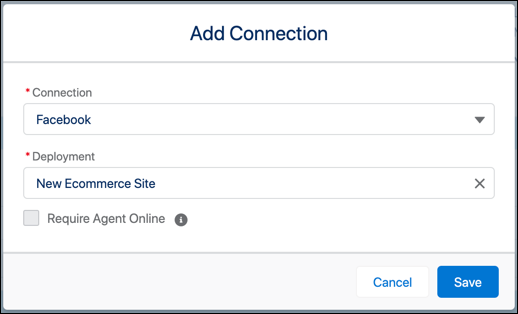

Note Chat users can enter the name of their chat deployment in the Deployment field, and Messaging users can enter their channel name. Bots search for active Messaging channels.
4. To disable the chat button when no service reps are available for escalation, select **Require Agent Online**.
- **[Channel-Specific Rendering for Choices Components](https://help.salesforce.com/s/articleView?id=service.bots_service_channel_choices_rendering.htm&release=264.0.0&type=5)**
Choices components render differently depending on the messaging channel. Each channel supports unique interactive message types and limits.
#### See Also
- [Route Conversations to and from Your Enhanced Bot](https://help.salesforce.com/s/articleView?id=service.bots_service_enhanced_route.htm&release=264.0.0&type=5 "Use Omni-Channel Flow to send conversations to and from your bot over enhanced Messaging channels. Or connect your enhanced bot to Slack or the Einstein Bots API on the Bot Overview page.")