
Einstein Bots includes two types of data: event data and intent data. Intent data, the data bots use to decide between intents, is discussed in Intent Management. Event data shows the details of actual bot conversations. You can use event data to create reports on trends, drill down into sessions to identify errors at the source, and use versioning to seamlessly update your bot.
Required Editions
| View supported editions. |
Hierarchy of Bot Event Data
Einstein Bots are structured in a way that is easy for Admins to understand. Like Flows, Bots follow a simple hierarchy:
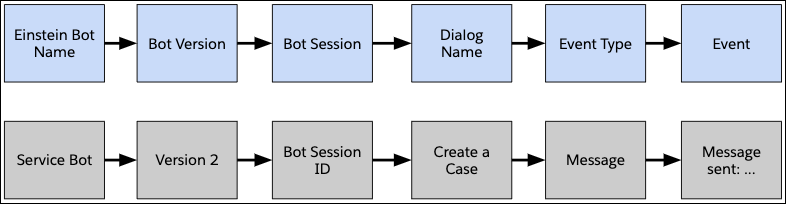
The bot stores different types of data at the Bot Name level versus the Bot Version level. At the Bot Name level, the following data is available:
- Bot Name: The bot name listed on the Bot Overview page.
- Bot API Name: The API name associated with this bot when it was created.
- Bot Description: A short description of the bot. The description is created in the Wizard and can be edited on the Bot Overview page.
- Channel Association: The channel name assigned to this bot on the Bot Overview Page.
- Entities: The type of data that you want to collect from a customer.
- Local Intents & Utterances: The utterances used to train this particular bot.
- Intent Sets: groups of common utterances used to train intents over multiple bots.
At the Bot Version level, different data is stored. A team can have multiple versions of a bot, but only one active version at a time.
- Bot Language: The primary language assigned to the bot version in the Wizard.
- Bot Response Delay: The amount of time assigned to the bot to wait in between responses. This setting is on the Bot Overview page.
- Log Conversations: The setting defined on the Bot Overview Page that instructs the bot to log all conversations.
- Bot User: The profile attached to the bot. By default, the profile is the Basic Chatbot User, but if the bot requires access to more objects, create and assign a custom profile.
- Dialogs: The dialogs inside the bot. In the Builder, dialogs are in the Dialogs menu.
- Variables: The variables assigned to the bot. Variables are in the Variables section of the Bot Builder.
Reporting on Bot Event Data
- You can use report types to build bot event data into reports. Bot event data can be built into reports by creating custom report types on the Conversation Definition object.
- The entities that you can use inside report types are in the Bot Data Reference Guide.
- Bot session data is available through standard reports. You can add more data such as chat transcripts, messaging sessions, and bot event logs with access to CRM Analytics.
Bot Session & Event Data Limitations
- An intent set can only be assigned to a single bot intent at a time.
- To move the intent set to another dialog, you can remove the original connection on the Dialog Intent page and then reconnect it to the new dialog.
- Before you delete a dialog, remove the intent set. If you delete a dialog with an attached intent set, that intent set remains assigned to that dialog.
- Due to high volume, bot event and session data are only stored for 7 days. You can download this data or copy it to another object for longer storage.
- Turn off the Log Conversation Data setting on the Bot Overview page if you have concerns about the bot capturing personal identifying information (PII) of your customers.
Deleting Bot Event Data
Deleting data at the Bot Version level can have
unintended ramifications on the data model. For instance, if a dialog is assigned to an intent
set in Version 1 of the Bot and then in Version 2 the dialog is deleted, the intent is still
attached to the bot. To back out a dialog intent set from a bot, remove the intent set from the
dialog by clicking  next to the intent set and clicking
Delete. Once removed, the dialog can be deleted and the intent set can be used
elsewhere.
next to the intent set and clicking
Delete. Once removed, the dialog can be deleted and the intent set can be used
elsewhere.
- Bot Data Reference Guide
A list of bot objects, events, and fields to use when you troubleshoot, develop, or build Einstein Bots.