---
schema_version: "1"
id: 0a37862b920c864070db4d6fa00af9ed7f6c666c8c3e22e014d4558a8acfbd96
title: Create Custom Context Variables
collection: admin
version: current
locale: en-us
portal_url: https://docs.salesforce.com/admin/current/en-us/service/264-0-0/bots_service_custom_context_variables.md
canonical_url: https://help.salesforce.com/s/articleView?id=service.bots_service_custom_context_variables.htm&release=264.0.0&type=5
source_site: help.salesforce.com
content_type: documentation
content_hash: bf9bfa1c2640cb57b407f09d266440458eece7f23469e4ac2c162715c2853875
description: Context variables for the contact are included, but you can create any type of context variable to use in your bot implementation. Use context variables for product names, store locations, referral URLs, or items in a customer’s shopping cart.
products:
- Service Cloud
- Service Intelligence
release: "264"
---
# Create Custom Context Variables
Context variables for the contact are included, but you can create any type of context variable to use in your bot implementation. Use context variables for product names, store locations, referral URLs, or items in a customer’s shopping cart.
### Required Editions
Custom context variables can be linked to multiple channels and objects. The Chat channel can map to the LiveChatTranscript object and the Messaging Channels can map from either the MessagingSession or MessagingUser objects.
Deleting mappings on custom context variables affect functionality. We recommend that you note where custom context variables are used to prevent data loss or showing merged fields inside a conversation.
1. Start with a deactivated bot. If your bot is active, click **Deactivate**.
2. In the Bot Builder menu, select Variables.
3. To create a variable, click **New**. Set the type to Context and give it a name and Data Type. Save your changes.
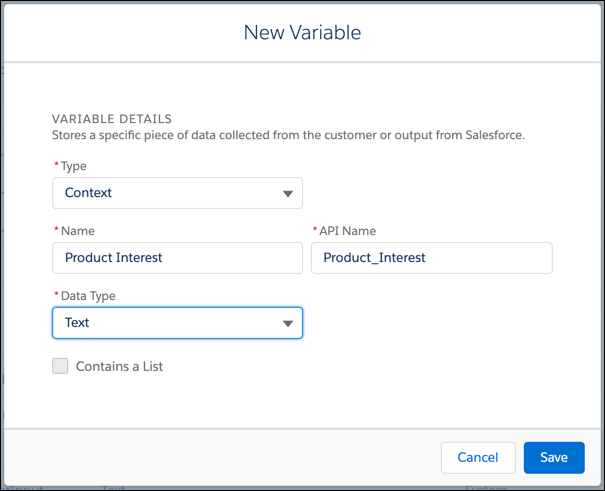

Note Custom context variables must have a Data Type of Text, Number, or ID.
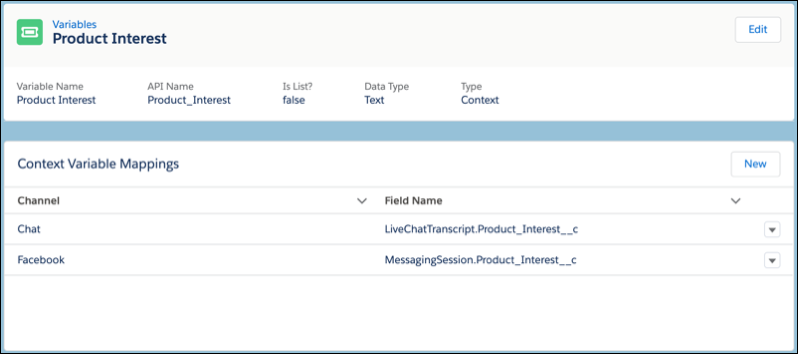
4. To open the variable detail page, click the variable name. To create a variable mapping, click **New**.
5. To map to the variable, select the Channel and the Field. Save your changes. The mapping shows with the channel and the API name of the mapped field.