
Use the Upgrade Agent tool on Agentforce Labs to convert an Einstein Bot to a new Agentforce Service Agent. The tool creates the new agent separately, so your existing bot remains available while you review and configure the new agent.
Required Editions
| Available in: Lightning Experience. |
| Available in: Enterprise, Performance, Unlimited, and Developer Editions with Foundations or Agentforce 1 Editions. |
| To use enhanced Messaging channels with AI agents, see required editions. |
| User Permissions Needed | |
|---|---|
| To build and manage Einstein Bots: |
Customize Application OR Modify Metadata OR Manage Bots |
| To build and manage Agentforce Service agents: |
Manage Agentforce Service Agents AND Manage AI Agents AND Agentforce Default Admin OR Customize Application |
The Upgrade Agent tool is available on Agentforce Labs or through Claude Code. Choose the path that works best for your workflow.
See Also
Upgrade a Bot Using the Upgrade Agent Tool
-
Go to Agentforce Labs.
Alternatively, click the + icon and select the bot package zip as input. However, you must still connect an org before you begin the upgrade, since the tool deploys the upgraded agent directly to the connected org.
 Note If you attach a bot package and also select a bot from a connected org, the Upgrade Agent tool upgrades the attached bot package and ignores the selected bot.
 -
Click Connect another org.
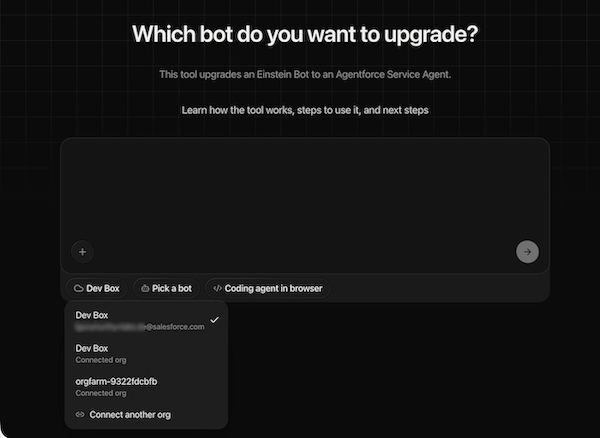
-
Click + Add an org.
Only production orgs can be added using this method. For sandbox orgs, use the Manually connect option in the next step.
-
Click Manually connect.
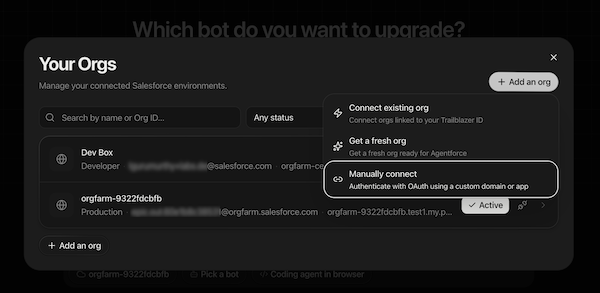
- Click Connect Production Org or Connect Sandbox org.
-
Optionally, use a custom domain. Enter your login domain and click
Connect.
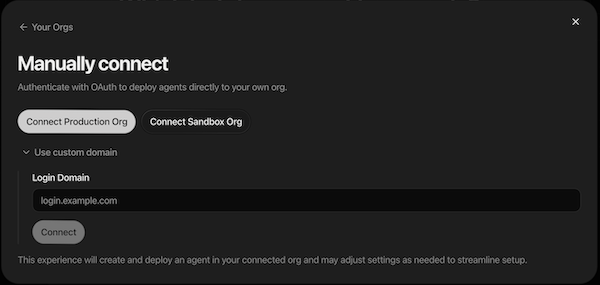 To connect to an internal orgfarm sandbox org, click Add an org > Connect existing orgs. This shows all internal orgs that you own. Some internal sandbox orgs can't be connected.
 -
Once the org is connected, click Pick a bot. The tool displays all
bots and versions from your org.
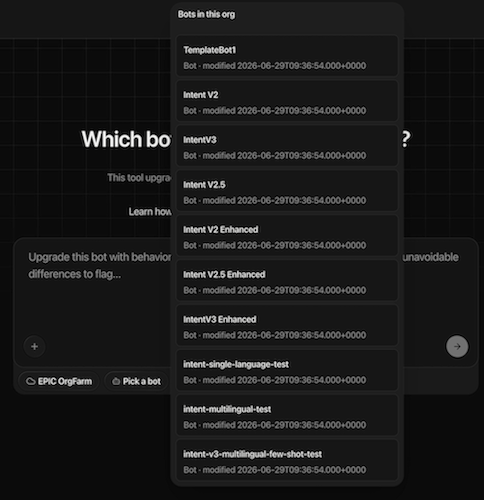
- Select the bot you want to convert.
-
Select Coding agent in browser to run the conversion directly in the
web tool without additional setup for conversion.
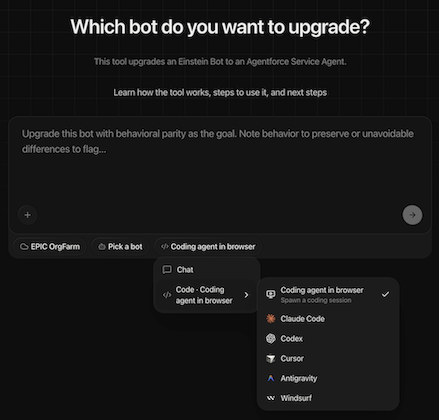 The tool supports multiple coding agents including Coding agent in browser (default), Claude Code, Cursor, Windsurf, and others.
 -
Click Convert with Labs Agent to start the upgrade.
The Labs Agent session opens and displays the upgrade command.
-
Press Enter to run the command with the default upgrade prompt.
The session shows the upgrade's progress. The upgrade is complete when the session displays a message confirming that the run is complete.
-
Go to Agentforce Builder to review, test, and activate the
upgraded agent.
Your Einstein Bot keeps running as is. The upgrade doesn't affect it or activate the new agent automatically.
Upgrade a Bot Using Claude Code
- Before using the Claude Code skill, verify that the Salesforce CLI is installed. In your terminal, run sf --version. If the CLI isn’t installed or is older than version 2.0.0, install or update it from https://developer.salesforce.com/tools/salesforcecli.
- If you have skills from the Agentforce Development Lifecycle (ADLC) Library (developing-agentforce, testing-agentforce, observe-agentforce) installed in your ~/.claude folder, delete them.
-
Create and navigate to an empty folder on your machine.
This folder is used as the root folder for the upgrade process.
- Install the Agentforce skills. In your terminal, run npx skills add forcedotcom/sf-skills.
- Select agentforce-bot-upgrade, agentforce-generate, agentforce-observe, and agentforce-test, then install them.
- Select Claude Code as the agent.
-
Select Project as the installation scope.
This restricts the skills to the current folder. Selecting Global can cause missing symlinks and skill availability issues.
- Create an alias for your org: sf org login web --instance-url <org_url> --alias <org-alias>
-
Run Claude Code in your terminal and invoke the skill: /agentforce-bot-upgrade --mode online --org-alias <alias> --bots bot1:v1,bot2:v2,bot3:v3 --interactive true/false
Alternatively, use natural language. For example: "I want to upgrade my Einstein bot to Service agent."
The skill supports both interactive and non-interactive modes. In interactive mode, the tool prompts you for each decision. In non-interactive mode, the tool uses default settings.
After the upgrade completes, review the generated agent in Agentforce Builder. Some bot elements aren't included in the upgraded agent. For details, see Considerations for upgrading Einstein Bots.
