---
schema_version: "1"
id: 7da9b23671e1db951b156948ea5e3f0bfc3d9dc4b3b809fd851b05c99d98c962
title: Add a Custom Variable
collection: admin
version: current
locale: en-us
portal_url: https://docs.salesforce.com/admin/current/en-us/service/264-0-0/bots_service_add_slot.md
canonical_url: https://help.salesforce.com/s/articleView?id=service.bots_service_add_slot.htm&release=264.0.0&type=5
source_site: help.salesforce.com
content_type: documentation
content_hash: 806bc208ce4558ab76deb2e93852ee75ccbd69f69debd8b66e77c9ad78c83246
description: Create custom variables to store information gathered from your customers.
products:
  - Service Cloud
  - Service Intelligence
release: "264"
---
# Add a Custom Variable

Create custom variables to store information gathered from your customers.

### Required Editions

<table class="slds-table slds-table_bordered slds-max-medium-table_stacked slds-m-bottom_small edition"><colgroup><col></colgroup><tbody><tr class=""><td class="slds-cell-wrap" style="vertical-align:top;"><a href="https://help.salesforce.com/s/articleView?id=service.einstein_service_intro.htm&amp;language=en_US" target="_blank">View supported editions</a>.</td></tr></tbody></table>

<table class="slds-table slds-table_bordered slds-max-medium-table_stacked slds-m-bottom_small permission">
        <colgroup>
          <col style="width:50%">
          <col style="width:50%">
        </colgroup>
        <thead class="slds-text-title_caps ">
          <tr class="">
            <th scope="colgroup" class="slds-cell-wrap" colspan="2" style="text-align:center;vertical-align:top;" id="d65508e57">User Permissions Needed</th>
          </tr>
        </thead>
        <tbody>
          <tr class="">
            <td data-label="User Permissions Needed" class="slds-cell-wrap" style="vertical-align:top;" headers="d65508e57 ">To build and manage Einstein Bots:</td>

            <td class="slds-cell-wrap" style="vertical-align:top;" headers="d65508e57 ">
              <p>Customize Application</p>
              <p>OR</p>
              <p>Modify Metadata</p>
              <p>OR</p>
              <p style="margin-bottom:0;">Manage Bots</p>
            </td>

          </tr>
        </tbody>
      </table>

![Note](https://sf-zdocs-cdn-prod.zoominsoftware.com/tdta-service-support_intelligence-264-0-0-production-enus/dcd06a7b-b5ab-448b-a767-4e2e90481508/images/icon_note.png)

Note Variables are specific to the version of the bot in which they’re created.

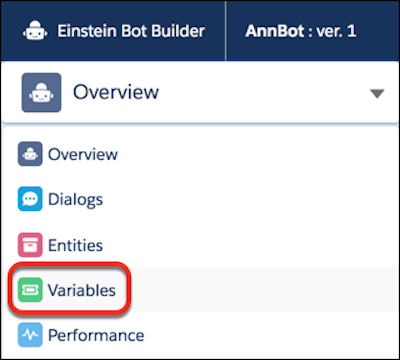
1. From the Bot Builder menu, click **Variables**.
    
    ![Variables option in Bot Builder menu](https://sf-zdocs-cdn-prod.zoominsoftware.com/tdta-service-support_intelligence-264-0-0-production-enus/dcd06a7b-b5ab-448b-a767-4e2e90481508/support_intelligence/images/bots/bots_service_builder_menu_slot.png)
2. In the Variables list view, click **New**.
3. Enter a variable label and API name.
4. Select the data type of this variable.
5. Save the variable.

#### See Also

- [What’s a Variable?](https://help.salesforce.com/s/articleView?id=service.bots_service_whats_a_variable.htm&release=264.0.0&type=5 "A variable is a container that stores a specific piece of data collected from the customer or output from Salesforce. Since variables are containers of information, they can be used within dialog actions as both inputs and outputs and can be inserted as part of the text in messages.")