---
schema_version: "1"
id: 5151865ea9df6bc699c48d29c87fbf4dd31626e198567e1dd02c5c901802c89c
title: Set Number as Default Caller Line Identifier
collection: admin
version: current
locale: en-us
portal_url: https://docs.salesforce.com/admin/current/en-us/service/264-0-0/afcc_sv_set_cli.md
canonical_url: https://help.salesforce.com/s/articleView?id=service.afcc_sv_set_cli.htm&release=264.0.0&type=5
source_site: help.salesforce.com
content_type: documentation
content_hash: 113ed4ec9fefa18bbc13496e588f44b27cd6f35c3be3275174f07668d8bfa404
description: Set a 10-digit long code or toll-free number that supports outbound calling as your default Caller Line Identification (CLI) number. The CLI number must be associated with a voice channel.
products:
  - Service Cloud
  - Digital Engagement
release: "264"
---
# Set Number as Default Caller Line Identifier

Set a 10-digit long code or toll-free number that supports outbound calling as your default Caller Line Identification (CLI) number. The CLI number must be associated with a voice channel.

### Required Editions

This article applies to:

Salesforce Voice (Native Telephony)

<table class="slds-table slds-table_bordered slds-max-medium-table_stacked slds-m-bottom_small edition"><colgroup><col style="width:100%"></colgroup><tbody><tr class=""><td class="slds-cell-wrap" style="vertical-align:top;"><a href="https://help.salesforce.com/s/articleView?id=service.voice_editions.htm&amp;release=264.0.0&amp;type=5" title="Learn about the user interfaces, editions, and add-ons that support Voice solutions by Salesforce.">View supported editions</a>.</td></tr></tbody></table>

<table class="slds-table slds-table_bordered slds-max-medium-table_stacked slds-m-bottom_small permission">
        <colgroup>
          <col style="width:50%">
          <col style="width:50%">
        </colgroup>
        <thead class="slds-text-title_caps ">
          <tr class="">
            <th scope="colgroup" class="slds-cell-wrap" colspan="2" style="text-align:center;vertical-align:top;" id="d46642e70">User Permissions Needed</th>
          </tr>
        </thead>
        <tbody>
          <tr class="">
            <td data-label="User Permissions Needed" class="slds-cell-wrap" style="vertical-align:top;" headers="d46642e70 ">To set a default CLI number:</td>

            <td class="slds-cell-wrap" style="vertical-align:top;" headers="d46642e70 ">
              <p>Agentforce Contact Center Admin (Salesforce Voice) permission set.</p>
              <p style="margin-bottom:0;">Learn how to view <a href="https://help.salesforce.com/s/articleView?id=platform.perm_sets_summary_page.htm&amp;language=en_US" target="_blank">permissions in this permission set</a>.</p>
            </td>

          </tr>
        </tbody>
      </table>

1. From Setup, use Quick Find to go to **Communication Channels**.
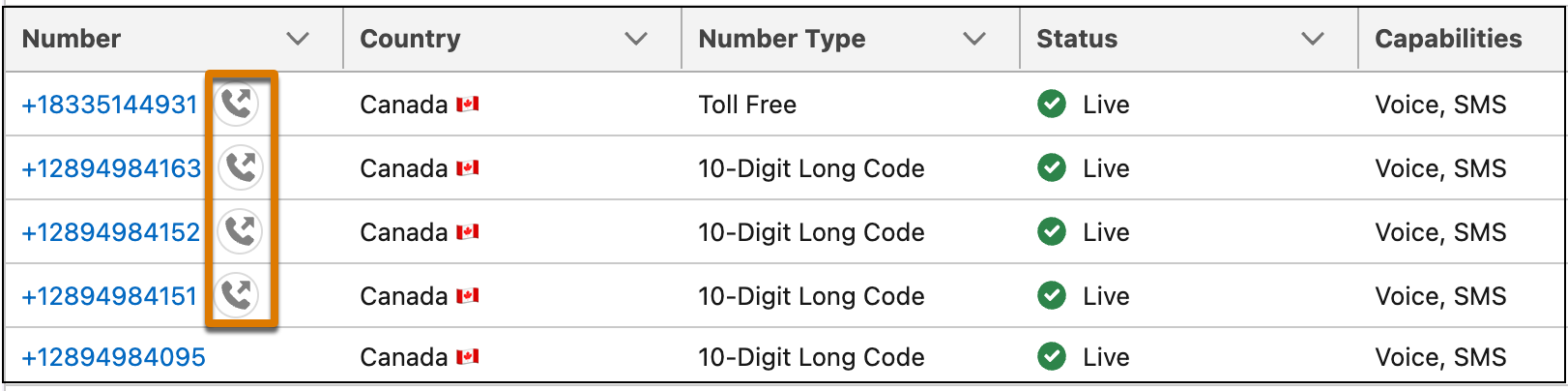
2. In the Numbers tab, search for the 10-digit long code or toll-free number you want to set as the CLI number. Numbers that are available to be set as default CLI are represented with this icon.
    
    ![Numbers that are enable for CLI.](https://sf-zdocs-cdn-prod.zoominsoftware.com/tdta-service-support_channels-264-0-0-production-enus/f3c4b3d2-ff86-4f7c-9fe2-3d8b23d35109/support_channels/images/agentforce_contact_center/afcc_sv_cli_available.png)
3. Click the number to open its details. From Outbound Call Settings, turn on **Set as Default Caller ID**.
4. Click **Yes, Set New CLI.**.
5. To verify that your number has been set as the default CLI, in the Numbers tab, search for your number. An icon next to the number indicates that it's the default CLI.

    
    ![Number set as CLI.](https://sf-zdocs-cdn-prod.zoominsoftware.com/tdta-service-support_channels-264-0-0-production-enus/f3c4b3d2-ff86-4f7c-9fe2-3d8b23d35109/support_channels/images/agentforce_contact_center/afcc_sv_cli_icon1.png)