---
schema_version: "1"
id: 42d0e30d59d06e0caa0b7e922560dcc680aa1dd3aedf15ffebe52dd7f1aef5b2
title: Manage WhatsApp Voice Channel
collection: admin
version: current
locale: en-us
portal_url: https://docs.salesforce.com/admin/current/en-us/service/264-0-0/afcc_sv_manage_wa_voice.md
canonical_url: https://help.salesforce.com/s/articleView?id=service.afcc_sv_manage_wa_voice.htm&release=264.0.0&type=5
source_site: help.salesforce.com
content_type: documentation
content_hash: 3d9a51fa127d2b76bb6ff465c3edc37a73f966e1eb9e05445eadb223281b17fd
description: Update your call and routing settings any time after you create the WhatsApp voice channel.
products:
  - Service Cloud
  - Digital Engagement
release: "264"
---
# Manage WhatsApp Voice Channel

Update your call and routing settings any time after you create the WhatsApp voice channel.

### Required Editions

This article applies to:

Salesforce Voice (Native Telephony)

<table class="slds-table slds-table_bordered slds-max-medium-table_stacked slds-m-bottom_small edition"><colgroup><col style="width:100%"></colgroup><tbody><tr class=""><td class="slds-cell-wrap" style="vertical-align:top;"><a href="https://help.salesforce.com/s/articleView?id=service.voice_editions.htm&amp;release=264.0.0&amp;type=5" title="Learn about the user interfaces, editions, and add-ons that support Voice solutions by Salesforce.">View supported editions</a>.</td></tr></tbody></table>

<table class="slds-table slds-table_bordered slds-max-medium-table_stacked slds-m-bottom_small permission">
        <colgroup>
          <col style="width:50%">
          <col style="width:50%">
        </colgroup>
        <thead class="slds-text-title_caps ">
          <tr class="">
            <th scope="colgroup" class="slds-cell-wrap" colspan="2" style="text-align:center;vertical-align:top;" id="d93702e70">User Permissions Needed</th>
          </tr>
        </thead>
        <tbody>
          <tr class="">
            <td data-label="User Permissions Needed" class="slds-cell-wrap" style="vertical-align:top;" headers="d93702e70 ">To manage a WhatsApp Voice channel:</td>

            <td class="slds-cell-wrap" style="vertical-align:top;" headers="d93702e70 ">
              <p>Agentforce Contact Center Admin (Salesforce Voice) permission set. </p>
              <p style="margin-bottom:0;">Learn how to view <a href="https://help.salesforce.com/s/articleView?id=platform.perm_sets_summary_page.htm&amp;language=en_US" target="_blank">permissions in this permission set</a>.</p>
            </td>

          </tr>
        </tbody>
      </table>

1. From Communications Channels, under All Channels, click the channel you want to edit.
    
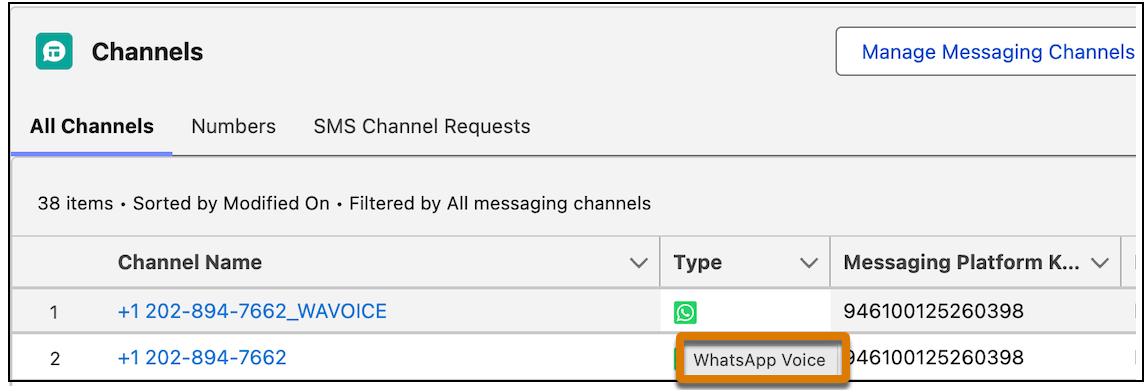
    To check if your channel is enabled for WhatsApp Voice, hover over the icon in the Type column. You should see the WhatsApp Voice tooltip.
    
    ![See the tooltip for the Type column.](https://sf-zdocs-cdn-prod.zoominsoftware.com/tdta-service-support_channels-264-0-0-production-enus/f3c4b3d2-ff86-4f7c-9fe2-3d8b23d35109/support_channels/images/agentforce_contact_center/afcc_sv_type.png)
2. From the **Voice** tab, update any settings you want and save your changes.