---
schema_version: "1"
id: 2a24b976e344fd2bf52ac8376fa0fb960a0d5b957a7ff4181b27fedbd23e48d0
title: Prevent Certain Events from Appearing on Schedules
collection: admin
version: current
locale: en-us
portal_url: https://docs.salesforce.com/admin/current/en-us/sales/264-0-0/salesforce_maps_adv_finetune_preventevents.md
canonical_url: https://help.salesforce.com/s/articleView?id=sales.salesforce_maps_adv_finetune_preventevents.htm&release=264.0.0&type=5
source_site: help.salesforce.com
content_type: documentation
content_hash: 0e19b238c1ab18cb0da88956150dfb1c0a80ce8443248e1d506fa01a8e1cf103
description: Reduce the noise and show only the things that matter when you schedule appointments in Salesforce Maps Advanced. Flag private and all-day events that you don’t want to schedule.
products:
- Sales
- Salesforce Maps
release: "264"
---
# Prevent Certain Events from Appearing on Schedules
Reduce the noise and show only the things that matter when you schedule appointments in Salesforce Maps Advanced. Flag private and all-day events that you don’t want to schedule.
### Required Editions
| User Permissions Needed |
| To customize settings: |
Customize Application |
1. From Setup, in the Quick Find box, enter Installed Packages, and then select **Installed Packages**.
2. Next to the Salesforce Maps package, click **Configure**.
3. Under Maps, select **Routes & Schedule**, and then click **Event**.
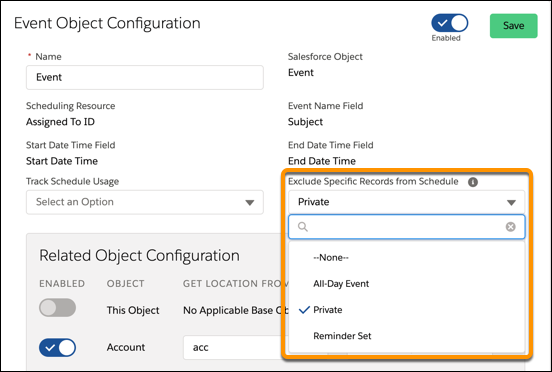
4. On the Event Object Configuration page, from Exclude Specific Records from Schedule, select the types of events that you want to omit from appearing on schedules. For example, a private event.