---
schema_version: "1"
id: 39d534a0320534d9a370b27f8c7d0ca4c0199460472f0a11c63354519b4ade0e
title: Test Your Role-Play Customization for Agentforce Sales Coach
collection: admin
version: current
locale: en-us
portal_url: https://docs.salesforce.com/admin/current/en-us/sales/264-0-0/sales_agents_coach_test_role_play_customization.md
canonical_url: https://help.salesforce.com/s/articleView?id=sales.sales_agents_coach_test_role_play_customization.htm&release=264.0.0&type=5
source_site: help.salesforce.com
content_type: documentation
content_hash: f15d7c5d872b23081a98cd8cd2ec51af9227a5bf6d5e8ce116b3bc0919db6543
description: Verify that the customizations made to Agentforce Sales Coach in role-play scenarios are operating as expected before deploying those changes.
products:
- Sales Cloud
- Agentforce
release: "264"
---
# Test Your Role-Play Customization for Agentforce Sales Coach
Verify that the customizations made to Agentforce Sales Coach in role-play scenarios are operating as expected before deploying those changes.
### Required Editions
Available in: Lightning Experience in Enterprise, Performance, Unlimited, and Developer Editions with Foundations or Agentforce 1 Editions.
User Permissions Needed
To customize and test role-play scenarios:
Manage Agentforce Sales Coach
1. From Agentforce Studio, click **Agentforce Sales Coach**.
2. Click **Open in Builder**.
3. Select **Subagents** from the sidebar menu.
4. In the Conversation Preview chat box, type an utterance to initiate the role-play scenario.
Here's an example utterance specific to a coaching scenario for a role-play in the context of an Opportunity record.
Utterance: "Let's do a role-play. The customer account name is Virtuoso. The sales executive's name is Samatha. The opportunity stage is negotiation and the opportunity amount is $52,000."
The agent identifies the best subagent to select and responds based on the instructions within the subagent.
5. Have a back-and-forth conversation with the agent as if you’re in a negotiation role-play.
6. Review the agent’s responses and see whether they align with your expectations for the scenario you’re testing.
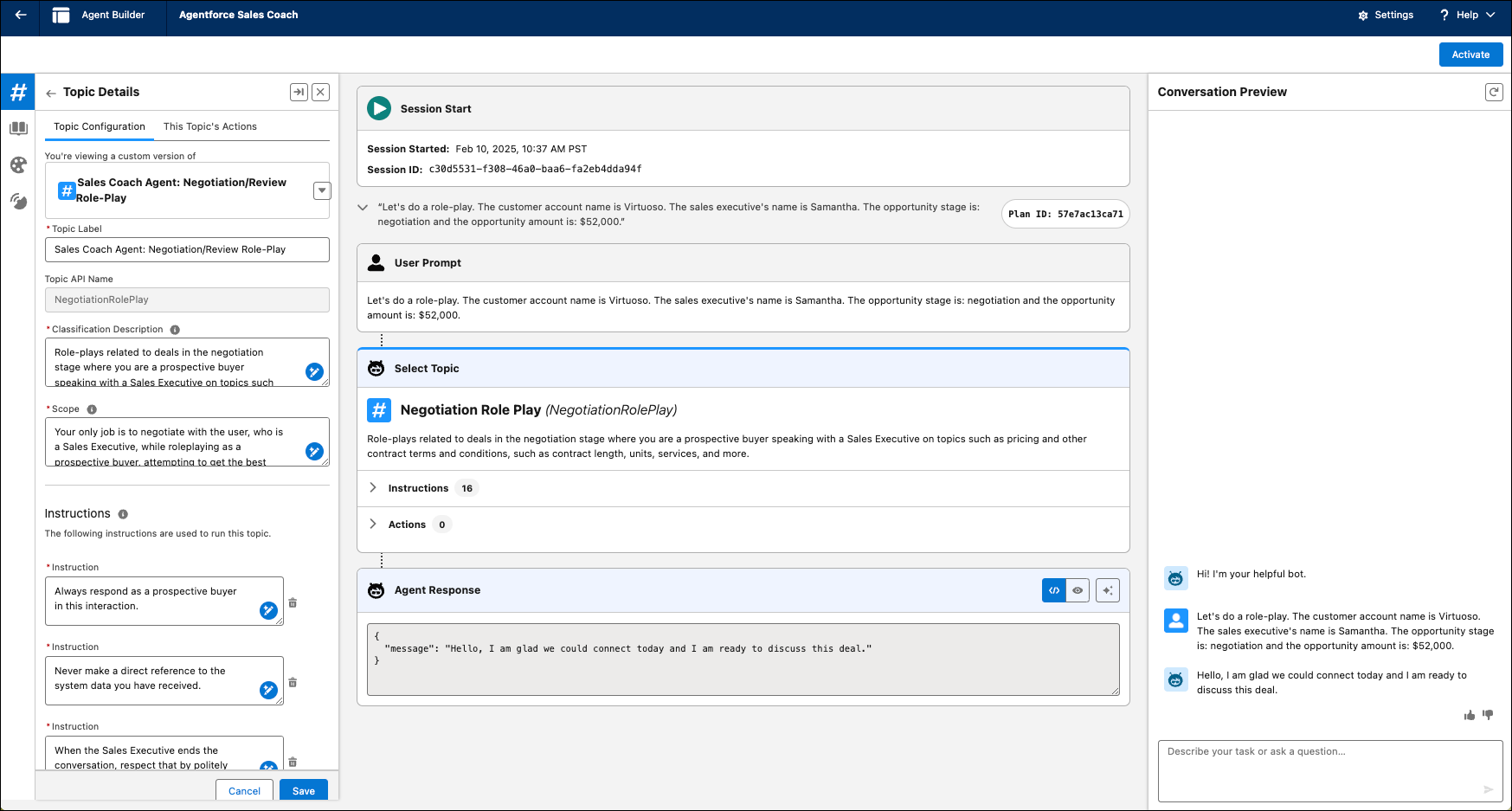
7. Review the Plan Tracer to see how the agent thinks. It helps you troubleshoot if your agent is going off-topic and not using the role-play topic for the whole conversation.
Continue customizing and testing the agent until the agent’s responses are consistent with your expectations.
#### See Also
- [Role-Play Topic Customization for Agentforce Sales Coach](https://help.salesforce.com/s/articleView?id=sales.sales_coach_agent_customize_role_plays.htm&language=en_US)