---
schema_version: "1"
id: 04c6e106ad6ed4bd2536cd384b103a6c50e5d7e91a25aeb6524bfc6e59e73284
title: Access the Trailmaker Apps
collection: admin
version: current
locale: en-us
portal_url: https://docs.salesforce.com/admin/current/en-us/sales/264-0-0/mth_trailmaker.md
canonical_url: https://help.salesforce.com/s/articleView?id=sales.mth_trailmaker.htm&release=264.0.0&type=5
source_site: help.salesforce.com
content_type: documentation
content_hash: 4fe5830ebff7ea986c28a9ec60b9ea103f975cd7fdec4f83e6c20f5fd73a3b3d
description: Users with permission to access Trailmaker Content, Trailmaker Release, or Trailmaker Settings can access the apps through the enablement site user menu.
products:
- Sales Cloud
- Sales Enablement
release: "264"
---
# Access the Trailmaker Apps
Users with permission to access Trailmaker Content, Trailmaker Release, or Trailmaker Settings can access the apps through the enablement site user menu.
### Required Editions
Available in: Enterprise, Performance, and Unlimited Editions
User Roles
This topic supports these enablement site
roles:
Salesforce Admins
Content Creators
Release Managers
Localization Team or Vendor
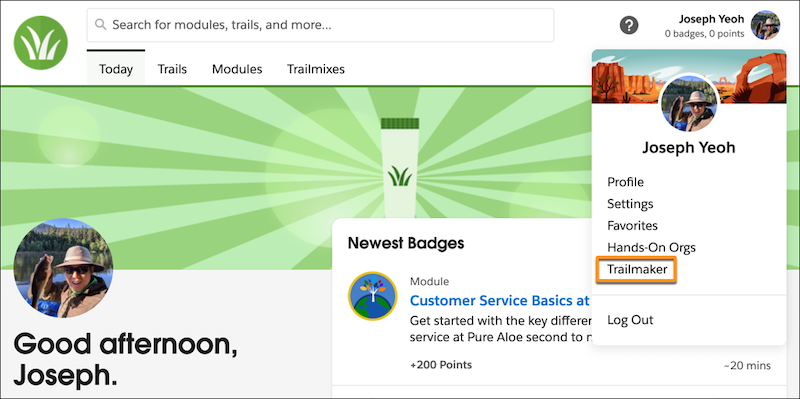
After a user logs in to your enablement site, they can access the Trailmaker apps by clicking their avatar and selecting Trailmaker.
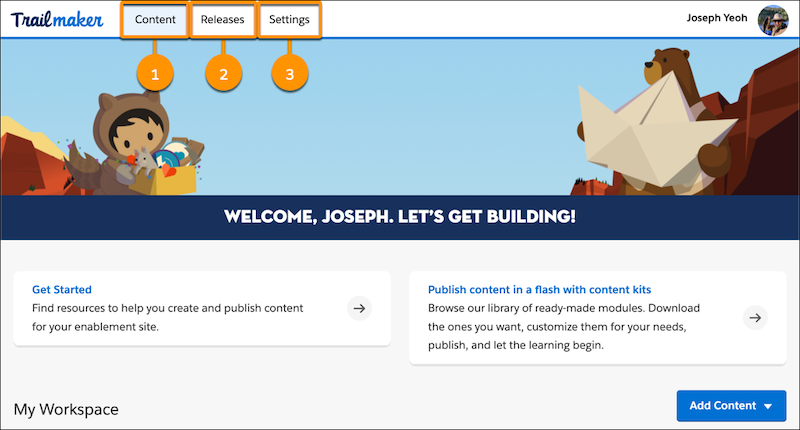
Then, depending on the user’s enabled permissions, they can access the individual apps from separate tabs.
| App | User Permissions Required |
| --- | --- |
| Trailmaker Content (1) | Create Content |
| Trailmaker Release (2) | Manage Releases |
| Trailmaker Settings (3) | Manage Site Settings |
#### See Also
- [Supported Browsers and Apps for Enablement Sites](https://help.salesforce.com/s/articleView?id=sales.mth_mytrailhead_tools.htm&release=264.0.0&type=5 "To help ensure that your company’s enablement experience is successful, learn about the different options for accessing content in the flow of work.")
- [Enablement Site User Menu Items](https://help.salesforce.com/s/articleView?id=sales.mth_user_menu.htm&release=264.0.0&type=5 "The menu that appears when a user clicks their avatar contains items for navigating different parts of your enablement site.")
- [Assign Permissions for Enablement Site Users](https://help.salesforce.com/s/articleView?id=sales.mth_assign_permissions.htm&release=264.0.0&type=5 "All your users—release managers, content creators, and learners—need the appropriate user permissions to access the appropriate features and fulfill their roles. A Salesforce admin configures user permissions in Setup in Salesforce.")