---
schema_version: "1"
id: 9678e02513c53432449c72a55efdb94de41bb116b32029eac7fe03f948ecbe35
title: Access Enablement Site Content on Mobile Devices
collection: admin
version: current
locale: en-us
portal_url: https://docs.salesforce.com/admin/current/en-us/sales/264-0-0/mth_trailhead_go.md
canonical_url: https://help.salesforce.com/s/articleView?id=sales.mth_trailhead_go.htm&release=264.0.0&type=5
source_site: help.salesforce.com
content_type: documentation
content_hash: ab60ad221979e1652305a9a9d47e82d350c200bdb6c2cc0edaa265fbb720659f
description: Learners can access enablement site content from anywhere using the Trailhead GO app on their iOS, iPadOS®, or Android™ device. Learners can earn badges and points in the app.
products:
- Sales Cloud
- Sales Enablement
release: "264"
---
# Access Enablement Site Content on Mobile Devices
Learners can access enablement site content from anywhere using the Trailhead GO app on their iOS, iPadOS®, or Android™ device. Learners can earn badges and points in the app.
### Required Editions
Available in: Enterprise, Performance, and Unlimited Editions
User Roles
This topic supports these enablement site roles:
Learners
The steps to access enablement site content from the Trailhead GO app depend on the authentication provider that your enablement site uses.
## Access with Salesforce Identity for Enablement
If you’re logging in to an enablement site that uses Salesforce Identity for Enablement authentication, follow the [link that you receive from your Salesforce admin](https://help.salesforce.com/s/articleView?id=sales.mth_trailhead_go_sifm_login.htm&release=264.0.0&type=5 "If your enablement site uses Salesforce Identity for Enablement authentication, users can access content in the Trailhead GO mobile app only by following a correctly formatted login URL. Create a link in the required format, test the link to verify that it works correctly, and share it with your users.").
After you log in, you can access only your enablement site—you can’t switch to access Trailhead content using the same credentials. To switch to Trailhead content, log out of the app, and then log back in with your Trailhead credentials.
## Access with Trailblazer.me (TBID)
If you’re logging in to an enablement site that uses TBID authentication, complete these steps.
1. Log in to the app with your Salesforce username and password.
2. Click **More**.
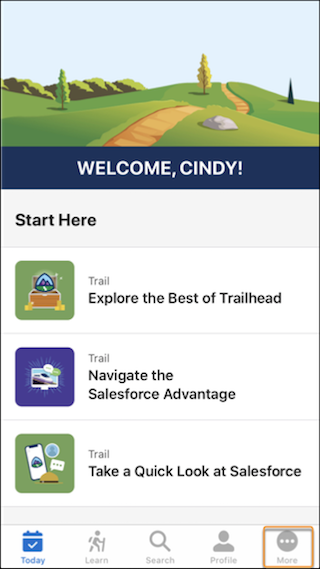
3. Click your name.
4. From the org picker, select your enablement site's subdomain name, and click **Continue**.
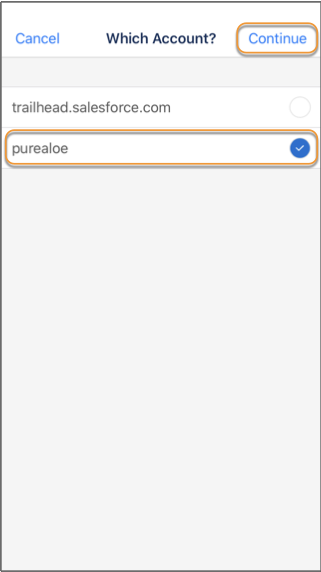
To switch to public Trailhead content, follow the same steps, but select the trailhead.salesforce.com domain instead.

Note If you switch your enablement site's authentication provider from TBID to Salesforce Identity for Enablement, learners can notice issues with the org picker in Trailhead GO. For more information, check out [Request to Switch Your Authentication Provider](https://help.salesforce.com/s/articleView?id=sales.mth_identity_change.htm&release=264.0.0&type=5 "If you selected Trailblazer.me (TBID) for your enablement site’s authentication provider, you can submit a Salesforce Customer Support case to request to switch to Salesforce Identity for Enablement. If you already selected Salesforce Identity for Enablement for your enablement site’s authentication provider, you can’t request to switch it to TBID.").
#### See Also
- [Authenticate Users to an Enablement Site on Mobile Devices (Salesforce Identity for Enablement)](https://help.salesforce.com/s/articleView?id=sales.mth_trailhead_go_sifm_login.htm&release=264.0.0&type=5 "If your enablement site uses Salesforce Identity for Enablement authentication, users can access content in the Trailhead GO mobile app only by following a correctly formatted login URL. Create a link in the required format, test the link to verify that it works correctly, and share it with your users.")
- [Considerations for Selecting an Authentication Provider](https://help.salesforce.com/s/articleView?id=sales.mth_considerations_for_choosing_mytrailhead_identity.htm&release=264.0.0&type=5 "To help you determine which authentication provider is right for your company’s enablement site, review how each provider affects your learning and enablement strategy. We recommend that all new enablement sites choose Salesforce Identity for Enablement.")
- [Request to Switch Your Authentication Provider](https://help.salesforce.com/s/articleView?id=sales.mth_identity_change.htm&release=264.0.0&type=5 "If you selected Trailblazer.me (TBID) for your enablement site’s authentication provider, you can submit a Salesforce Customer Support case to request to switch to Salesforce Identity for Enablement. If you already selected Salesforce Identity for Enablement for your enablement site’s authentication provider, you can’t request to switch it to TBID.")