---
schema_version: "1"
id: 3c567ddadc4298fd94cad4280361daa1e1044a335d05c9f48d55d4303fc0f33d
title: Preview a Release in Trailmaker Release
collection: admin
version: current
locale: en-us
portal_url: https://docs.salesforce.com/admin/current/en-us/sales/264-0-0/mth_preview_content_on_mytrailhead.md
canonical_url: https://help.salesforce.com/s/articleView?id=sales.mth_preview_content_on_mytrailhead.htm&release=264.0.0&type=5
source_site: help.salesforce.com
content_type: documentation
content_hash: cda6c274462ad2da75ada4514c3791411e1f5a138e027fff2754e154c71d076f
description: Your content stakeholders can preview all the new or changed trails and modules that you plan to publish in a release. The full release preview shows new or changed content in the context of all published content in your company’s enablement site. Only users with the appropriate permission can access the full release preview.
products:
- Sales Cloud
- Sales Enablement
release: "264"
---
# Preview a Release in Trailmaker Release
Your content stakeholders can preview all the new or changed trails and modules that you plan to publish in a release. The full release preview shows new or changed content in the context of all published content in your company’s enablement site. Only users with the appropriate permission can access the full release preview.
### Required Editions
Available in: Enterprise, Performance, and Unlimited Editions
User Roles
This topic supports these enablement site
roles:
Content Creators
Release Managers
Subject Matter Experts
## Release Preview Experience
The release preview provides these indicators.
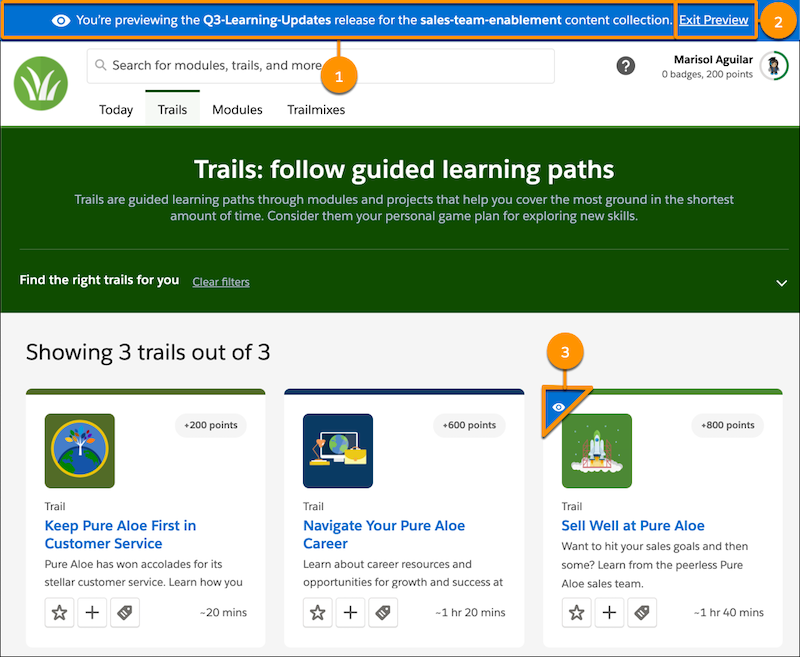
- A banner at the top of the page (1), which shows the API names of the release and the content collection that you’re previewing
- A link in the banner for exiting the preview (2)
- An eye icon (3) on any content that’s included in the release list but not yet published
In the release preview, you see everything that’s currently published for the content collection, plus whatever you’re adding or changing in the release that you’re previewing.
Let’s say that you update a module but not the trail that it belongs to. When you preview the trail, it looks the same as the published version. But when you preview the module, you see the changes that you made in that release.

Tip Certain types of errors in content, such as a missing unit in a module, block content updates from appearing in the release preview. If you’re previewing a module and don’t see your most recent changes, hover over the eye icon on the module. You can see when the module was most recently updated. If the date and time are earlier than your most recent changes, check the issues page for the release in Trailmaker Release. It can indicate errors in the module to fix.
## Release Preview Requirements
To access content in the release preview, a user needs the Preview Release permission and the link to the release preview.

Note The user doesn’t require access to the content collection that contains the release being previewed.
You can find the release preview link for your content in a few ways.
- Add content to an unpublished release from Trailmaker Content. The confirmation window includes a link to the content in the release preview.
- On the release page in Trailmaker Release, click**Preview**.
- From the Unpublished Releases section of the content collection page in Trailmaker Release, select **Preview** from the release’s Actions dropdown menu.
## Release Preview URL
If you know the enablement site's subdomain name and the API names of the content collection and release to preview, you can manually enter the release preview URL.
```
https://subdomain.my.trailhead.com/content/content-collection-API-name/enter-preview?release=release-API-name
```
Replace these variables with your values.
subdomain
Your subdomain name, such as purealoe.
content-collection-API-name
The API name of the content collection that contains the release to preview. For example, for a content collection named Sales Team Onboarding, the API name is sales-team-onboarding.
release-API-name
The API name of the release to preview. For example, for a release named 2022 Q1, the API name is 2022-Q1.
For this example, the release preview URL is:
```
https://purealoe.my.trailhead.com/content/sales-team-onboarding/enter-preview?release=2022-Q1
```
## Quizzes in Release Preview
In a release preview, a user can complete quizzes to confirm that the questions and answers are correct. A user can retake quizzes in preview mode multiple times.
But the release preview doesn’t record a user’s activity. The user doesn’t earn points or badges by completing quizzes and can’t create trailmixes, favorite content, or edit their profile. To perform these actions, the user must exit preview.
## Localized Content in Release Preview
If the release includes content that’s been localized for other supported languages, you can view the translated content in release preview. Navigate to the content in release preview and select the appropriate language.

Note Conversely, the content preview in Trailmaker Content shows only a module’s source language, not any localized content that’s included in the module’s backpack.
#### See Also
- [Preview a Module in Trailmaker Content](https://help.salesforce.com/s/articleView?id=sales.mth_tm_content_preview.htm&release=264.0.0&type=5 "Preview a module and units that you’re working on in your local Trailmaker Content workspace, and share the preview with collaborators. This preview provides an opportunity for content creators and collaborators to review formatted content before it’s added to a release. The preview is read-only, limited to one module, and isn’t available for a trail.")
- [Assign Permissions for Enablement Site Users](https://help.salesforce.com/s/articleView?id=sales.mth_assign_permissions.htm&release=264.0.0&type=5 "All your users—release managers, content creators, and learners—need the appropriate user permissions to access the appropriate features and fulfill their roles. A Salesforce admin configures user permissions in Setup in Salesforce.")
- [Create Content with the Trailmaker Content App](https://help.salesforce.com/s/articleView?id=sales.mth_use_trailmaker_to_create_content.htm&release=264.0.0&type=5 "After writers finalize your company’s learning content, move your draft to Trailmaker Content. Create metadata for the trails, modules, and units that you want to publish, and format your unit content. You also use Trailmaker Content to maintain published content.")
- [Maintain Content with Trailmaker Content](https://help.salesforce.com/s/articleView?id=sales.mth_maintain_content_with_tm_content.htm&release=264.0.0&type=5 "Use Trailmaker Content to keep your content current. For example, you can edit existing content to correct errors or update work processes. You also can add a unit to an existing module or add a module to an existing trail.")
- [Translate Enablement Site Content to Other Languages](https://help.salesforce.com/s/articleView?id=sales.mth_localize_your_content.htm&release=264.0.0&type=5 "Learners can select a different language for viewing your enablement site. To provide localized versions of your learning content for supported languages, work with a localization team or vendor.")