---
schema_version: "1"
id: 01945955cb2a5144e131a763c187a03b4e852af86bfa28fb256548919b17f382
title: Track and Assign Enablement Site Content with the Trail Tracker App
collection: admin
version: current
locale: en-us
portal_url: https://docs.salesforce.com/admin/current/en-us/sales/264-0-0/mth_install_trail_tracker_app.md
canonical_url: https://help.salesforce.com/s/articleView?id=sales.mth_install_trail_tracker_app.htm&release=264.0.0&type=5
source_site: help.salesforce.com
content_type: documentation
content_hash: 3abf94f030b32013bfcbc9ac458019f2cd4fb18d09a062ef7d1ecf24fef0dc9f
description: Trail Tracker is a free app for assigning and reporting on content for your learners. The app, which is a managed package and not part of your enablement site, adds capabilities for assigning trailmixes, setting deadlines, tracking completion progress, and customizing assignment notifications. The app also provides reports and dashboards to help you get started.
products:
- Sales Cloud
- Sales Enablement
release: "264"
---
# Track and Assign Enablement Site Content with the Trail Tracker App
Trail Tracker is a free app for assigning and reporting on content for your learners. The app, which is a managed package and not part of your enablement site, adds capabilities for assigning trailmixes, setting deadlines, tracking completion progress, and customizing assignment notifications. The app also provides reports and dashboards to help you get started.
### Required Editions
Available in: Enterprise, Performance, and Unlimited Editions
User Roles
This topic supports these enablement site roles:
Salesforce Admins
You can also use Trail Tracker as a portal and reporting application for other systems. For example, you can integrate it with your own learning management system or an online employee Experience Cloud site.
Download the free Trail Tracker app from AppExchange. The AppExchange listing includes links to the installation guide and FAQ.
Trail Tracker syncs your org with your enablement site only one time per day, but you can schedule the sync for any time you like.
## Trail Tracker Roles
Trail Tracker users fall into three primary roles.
Assigners
Users who assign trailmixes and run reports on progress and completion.
Managers
Users who run reports on progress and completion but don’t assign trailmixes.
Admins
Users who assign permissions and schedule Trail Tracker synchronization with your enablement site.
## Trailmix Assignments
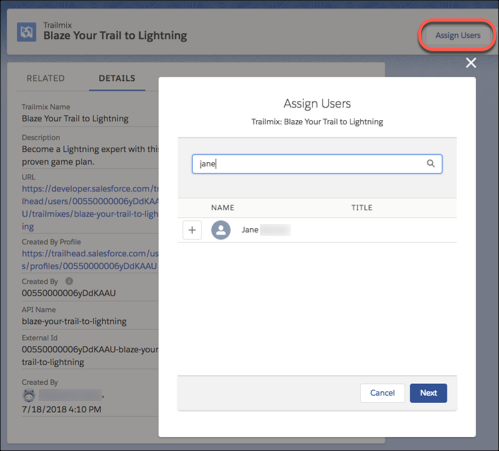
Assign a trailmix when you have skills that you want users to learn. For example, if you’re rolling out Sales, make sure that your sales team is ready to use all its features. An assigned trailmix appears on the learner’s Today page and Trailmixes index page when they navigate your enablement site. To add users to a trailmix, click **Assign Users**.
Optionally, assign a due date, which must:
- Use ISO-8601 format.
- Specify GMT time.
- Represents a date that’s in the future.
You can also configure the Salesforce mobile app to send reminders when a trailmix is due.
## Trailmix Assignment Considerations
To assign a trailmix to a learner:
- The learner must have already logged in to the enablement site so that their corresponding user record exists. Assigning a trailmix depends on the learner's user record in the enablement site and not their user record in Salesforce.
- The learner must have access to the content collection that contains the trailmix's trails and modules. If a learner can't access the content collection that a trail or module belongs to, they can't access any part of the trailmix.
- The learner can't have the trailmix assigned already.
- The trailmix must be public, which means that it's available to all learners who can log in to your enablement site.
When you assign multiple learners to a trailmix at the same time, the bulk assignment fails if any learner in the batch meets these criteria.
## Module Assignments
You can use Trail Tracker to assign individual modules. However, the modules don’t appear on the user’s Today page on your enablement site. You can track individually assigned modules and projects only in Trail Tracker.

Tip Make sure that a learner can access the content collection that contains the module.
## Sandbox Support
You can install the Trail Tracker app in a sandbox, with some limitations.
- [Sandbox Support for Enablement Sites](https://help.salesforce.com/s/articleView?id=sales.mth_sandbox.htm&release=264.0.0&type=5 "Enablement sites and associated tools, such as the Trail Tracker app, have limited support in a sandbox.")
- [Test Trailmix Assignments with the Trail Tracker App in a Sandbox](https://help.salesforce.com/s/articleView?id=sales.mth_sandbox_trailmix.htm&release=264.0.0&type=5 "You can test assigning and unassigning trailmixes with the Trail Tracker app in a sandbox.")
## Process Automation
You can automate the learning process using the Salesforce Platform.
- Set up automated Chatter posts or emails to alert users to assigned content or remind them about an in-progress trailmix.
- To find and report on the trailmixes important to you, customize reports and dashboards.
- To help users quickly find relevant trailmixes, create custom reports, list views, or notifications.
## Trailmix Reports
Trail Tracker comes with default reports and dashboards to monitor assignments and completion rates. For example, track your sales team’s completion progress to make sure that they’re up to speed before features are rolled out.

Tip To report on content from any content collection, the user who runs the report must have the View All Content permission.
## Trailmix Reports Considerations
When a learner creates a trailmix, the default reports automatically track the learner's progress in the trailmix. The trailmix's status in reports depends on how much content the learner has already completed when they created the trailmix.
| Learner's Progress When they Created the Trailmix | Trailmix Status |
| --- | --- |
| The learner hasn't completed any content in the trailmix. | In progress |
| The learner has already completed some content in the trailmix. | In progress |
| The learner has already completed all content in the trailmix. | Completed |
If a trailmix is deleted, the status of the trailmix is locked in reports.
| Learner's Progress When the Trailmix is Deleted | Trailmix Status |
| --- | --- |
| The learner has the trailmix in progress. | In progress, but the learner can't complete the trailmix. |
| The learner has completed the trailmix. | Completed, but the trailmix remains in the learner's Trailmixes tab on your enablement site, and the learner can't unfollow it. |
In some cases, a learner's progress through a trailmix is no longer tracked.
| How the Learner Interacts with a Trailmix | How Progress is No Longer Tracked |
| --- | --- |
| The learner creates the trailmix. | The learner's progress is always tracked and can't be untracked. |
| The learner follows a trailmix. | If the learner unfollows the trailmix, their progress is no longer tracked. |
| The learner completes a step or starts a module in a trailmix. | If the learner unfollows the trailmix, their progress is no longer tracked. |
| The learner is assigned a trailmix from Trail Tracker. | The learner can't unfollow an assigned trailmix. If the learner is unassigned from the trailmix, their progress is still tracked. |

Note The default reports can show some discrepancies in dates and times for a learner's progress in a trailmix. Sometimes, a trailmix's completion timestamp can differ from the completion timestamp of the last module or step in the trailmix. If these discrepancies affect your notifications or reports, you can create Badge and User Badge reports for tracking progress of the content that comprise a trailmix.
## Impact on Static Resources
Trail Tracker stores your enablement site's badge and trail art image files as static resources in your org. This storage counts against your org's static resource limit of 250 MB.

Note These static resources remain in your org even after a trail or module is archived.
#### See Also
- [Find Content on an Enablement Site](https://help.salesforce.com/s/articleView?id=sales.mth_find_content.htm&release=264.0.0&type=5 "Learners can quickly find or search for content, including in-progress content, assigned content, or content marked as favorite.")
- [Create and Share Custom Content Paths with Trailmixes](https://help.salesforce.com/s/articleView?id=sales.mth_curate_content_with_trailmixes.htm&release=264.0.0&type=5 "A trailmix is a customized learning journey that you can create for yourself or for others. You can use any enablement site or Trailhead content you like. You also can include custom steps, such as in-person activities, or links to videos and other online content.")
- [Make a Trailmix Public or Private](https://help.salesforce.com/s/articleView?id=sales.mth_share_a_trailmix.htm&release=264.0.0&type=5 "When a user creates a trailmix, it’s private by default, and only the user that created the trailmix can see it. The user can make a trailmix public and share it with other learners on the enablement site, or make a trailmix that they previously shared private again.")
- [Allow Learners to Access Enablement Site Content Collections](https://help.salesforce.com/s/articleView?id=sales.mth_content_permissions.htm&release=264.0.0&type=5 "Ensure that learners can access only the trails and modules that are relevant to their disciplines or job requirements. Create content collections for your different audiences, and then use permission sets to enable access to specific content collections. Only learners with permission to access a particular content collection can view and complete the trails and modules included in the collection.")
- [Considerations for Getting Started with Content Collections](https://help.salesforce.com/s/articleView?id=sales.mth_content_permissions_considerations.htm&release=264.0.0&type=5 "Content collections provide flexibility for your company’s learning experience, but they also introduce complexity forenablement sites that have published content. If your company already has an enablement site, you can expand your learning experience by using content collections.")
- [Define Static Resources](https://help.salesforce.com/s/articleView?id=platform.pages_static_resources_create.htm&language=en_US)
- [_AppExchange:_ Trail Tracker](https://appexchange.salesforce.com/listingDetail?listingId=a0N3A00000EFpAtUAL)
- [_PDF:_ Trail Tracker Installation Guide](https://org62.my.salesforce.com/sfc/p/#000000000062/a/3y000000BpHK/4chVdrPHV7vbnIcv5mjiBn2rcSSWscGf.mxYtTwWzX4)
- [_PDF:_ Trail Tracker FAQ](https://org62.my.salesforce.com/sfc/p/000000000062/a/3y000000BpHP/Nf71dOwGi1h9Dseebu_4PveJ5v7auMi2R30E.V3_osg)
- [_Trailhead:_ Automate Your Business Processes with Salesforce Flow](https://trailhead.salesforce.com/en/content/learn/trails/automate_business_processes)