---
schema_version: "1"
id: 95ff3ba8f532319547f15f020d000fb1077a22cd98a62e0f98b42230ca859d91
title: Considerations for Managing Releases
collection: admin
version: current
locale: en-us
portal_url: https://docs.salesforce.com/admin/current/en-us/sales/264-0-0/mth_how_releases_work.md
canonical_url: https://help.salesforce.com/s/articleView?id=sales.mth_how_releases_work.htm&release=264.0.0&type=5
source_site: help.salesforce.com
content_type: documentation
content_hash: 57a929e1086223319626427b79b40a58bc89e0e6753e98246f8791a2e42da3b7
description: A release specifies the list of the modules and trails that you want to publish together at the same time. You can publish a module or trail only if it’s added to a release. Before you start lining up your planned releases, review some important guidelines about how releases work in Trailmaker.
products:
- Sales Cloud
- Sales Enablement
release: "264"
---
# Considerations for Managing Releases
A release specifies the list of the modules and trails that you want to publish together at the same time. You can publish a module or trail only if it’s added to a release. Before you start lining up your planned releases, review some important guidelines about how releases work in Trailmaker.
### Required Editions
Available in: Enterprise, Performance, and Unlimited Editions
User Roles
This topic supports these enablement site
roles:
Content Creators
Release Managers
## Releases and Content Collections
Your enablement site can support up to 100 content collections, and each content collection can contain multiple releases, up to 500 MB of content. A release manager can maintain separate releases for each content collection so that your company can deliver appropriately timed updates for each collection’s audience.
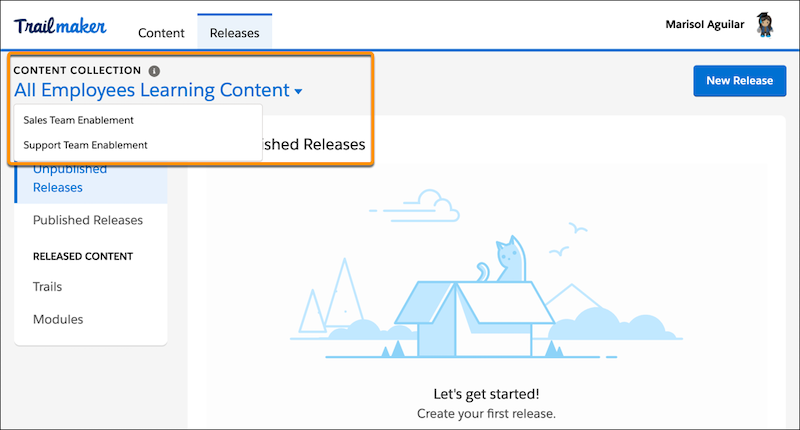
In Trailmaker Release, view all the releases for a particular content collection by selecting a content collection from the dropdown menu.
## Release Items and Operations
When you create a release, Trailmaker works behind the scenes to make a copy of all the content that’s currently published for that content collection. The copy includes all of the content’s metadata, such as applied filters. There’s no user experience where this copy is visible to a release manager, but the copy is there in the background, waiting to receive updates.
A release contains a list of items. In the background, Trailmaker refers to the list as the manifest, and each line item in the list is a manifest item. Each manifest item references the content’s API name and the operation to perform on that content in the release. Select one of these operations.
Archive
Hides content that’s already been published to your enablement site.
Restore
Brings archived content back out of hiding.
Upsert
Adds content to your enablement site, or updates content that’s already been published.
For the Archive and Restore operations, the manifest item is all the information that Trailmaker requires to process the changes in the release. In the invisible background copy of the content collection, Trailmaker hides or restores the corresponding content. When the release is published, those changes propagate to your enablement site's live production environment.
For the Upsert operation, the manifest item alone isn’t enough information for Trailmaker to process the changes in the release. Trailmaker also requires the backpack for the content that you’re adding or updating. The way in which you add content to a release determines whether Trailmaker has all the data it requires to process changes for the release.
- When you add content to a release from Trailmaker Content, Trailmaker automatically adds the manifest item, assigns the Upsert operation to the item, and uploads the backpack to the release.
- When you add content to a release from Trailmaker Release, you manually specify a manifest item and its operation. When you select the Upsert operation for an item, the content’s backpack isn’t uploaded, and Trailmaker reports a release error until the backpack is added. To upload the backpack, go to Trailmaker Content and add the corresponding content to the release.

Tip In general, we recommend that you always use Trailmaker Content to upsert an individual item in a release. You save a few clicks, avoid potential confusion, and add the manifest item and backpack in the same action.
Adding content to a release from Trailmaker Release is useful when:
- You’re archiving or restoring content in the release.
- You’re adding multiple line items to the release at one time. For example, maybe you’re a release manager, and you’re making a list of the content that you plan to include in the release. Maybe other people are responsible for actually adding content to the release when it’s ready. In this case, the release manager can use the list to track which content backpacks are still missing from the release manifest.
When you publish the release, the background copy of the content collection overwrites all the existing content in the content collection.
## Unpublished Releases and Release Timestamps
You can have more than one unpublished release in each content collection. In general, we recommend that you have only one unpublished release per content collection at one time. This strategy can help you manage changes in metadata between releases.
Most companies want to provide continuous and current learning experiences, so Trailmaker lets you create multiple unpublished releases per content collection. Trailmaker also checks the timestamps of your unpublished releases to help you publish releases in the correct sequence and avoid unintentionally overwriting changes between your unpublished releases.
For example, let’s say that your team published a release in January, and then immediately creates another release for February.
| Release | Date Created | Date Published | Scope |
| --- | --- | --- | --- |
| February | February 7, 2021 | Unpublished | Everything in the January release, plus new changes planned |
| January | January 7, 2021 | January 31, 2021 | January release |
But, a writer discovers errors in the January release, and requests a new, intermediate bug fix release to quickly resolve the issues. Now, there are two unpublished releases, each with different sets of planned changes.
| Release | Date Created | Date Published | Scope |
| --- | --- | --- | --- |
| February | February 7, 2021 | Unpublished | Everything in the January release, plus new changes planned, but not the bug fixes |
| Intermediate Bug Fixes | February 14, 2021 | Unpublished | Everything in the January release, plus bug fixes |
| January | January 7, 2021 | January 31, 2021 | January release |
Now, let’s say that you immediately publish the Intermediate Bug Fixes release.
| Release | Date Created | Date Published | Scope |
| --- | --- | --- | --- |
| February | February 7, 2021 | Unpublished | Everything in the January release, plus new changes planned, but not the bug fixes |
| Intermediate Bug Fixes | February 14, 2021 | February 21, 2021 | Everything in the January release, plus bug fixes |
| January | January 7, 2021 | January 31, 2021 | January release |
If you then try to publish the February release, Trailmaker Release checks the timestamp for when the release was created, and reports an error. The February release was created earlier (February 7) than the Intermediate Bug Fixes release (February 14), and the Intermediate Bug Fixes release was published (February 21) before the February release. Trailmaker prevents you from publishing the February release, which doesn’t include the bug fixes and would have overwritten changes published with the Intermediate Bug Fixes release. This behavior helps preserve your content and its metadata—including titles, API names, and applied filters—between releases.
## Release Limitations
Each release can include up to 1,000 items.
#### See Also
- [Create a Release in Trailmaker Release](https://help.salesforce.com/s/articleView?id=sales.mth_create_release_in_tm_release.htm&release=264.0.0&type=5 "You can add modules and trails to an unpublished release even if you haven’t yet created the content in Trailmaker Content. You also can create the release and wait for writers to add their content to the release from Trailmaker Content.")
- [Limits for Enablement Site Data](https://help.salesforce.com/s/articleView?id=sales.mth_mytrailhead_limits.htm&release=264.0.0&type=5 "We restrict the size of certain data in your enablement site, such as an image file or the scope of trailmixes. As you add learning content to your enablement site, consider these limits to help you deliver a successful learning experience.")