---
schema_version: "1"
id: bad366c7015661fb0a94ed234df897be200bc8da2b4a120d2685915db09c27bb
title: Filters for Enablement Site Trails and Modules
collection: admin
version: current
locale: en-us
portal_url: https://docs.salesforce.com/admin/current/en-us/sales/264-0-0/mth_filters.md
canonical_url: https://help.salesforce.com/s/articleView?id=sales.mth_filters.htm&release=264.0.0&type=5
source_site: help.salesforce.com
content_type: documentation
content_hash: f1d0cd23d00a5ac3cc3fd4a9365a6fc784d202d05f5c6f820a68f85b116b97af
description: When content creators add trails and modules in Trailmaker Content, they apply filter values to their content.
products:
  - Sales Cloud
  - Sales Enablement
release: "264"
---
# Filters for Enablement Site Trails and Modules

When content creators add trails and modules in Trailmaker Content, they apply filter values to their content.

### Required Editions

<table class="slds-table slds-table_bordered slds-max-medium-table_stacked slds-m-bottom_small edition"><colgroup><col></colgroup><tbody><tr class=""><td class="slds-cell-wrap" style="vertical-align:top;">Available in: <strong>Enterprise</strong>, <strong>Performance</strong>, and <strong>Unlimited</strong> Editions</td></tr></tbody></table>

<table class="slds-table slds-table_bordered slds-max-medium-table_stacked slds-m-bottom_small permission">
      <colgroup>
        <col style="width:50%">
        <col style="width:50%">
      </colgroup>
      <thead class="slds-text-title_caps ">
        <tr class="">
          <th scope="colgroup" class="slds-cell-wrap" colspan="2" style="text-align:center;vertical-align:top;" id="d3437e61">User Roles</th>
        </tr>
      </thead>
      <tbody>
        <tr class="">
          <td data-label="User Roles" class="slds-cell-wrap" style="vertical-align:top;" headers="d3437e61 ">This topic supports these enablement site
            roles:</td>

          <td class="slds-cell-wrap" style="vertical-align:top;" headers="d3437e61 ">
            <ul>
              <li>Salesforce Admins</li>

              <li>Content Creators</li>

              <li>Release Managers</li>

            </ul>
          </td>

        </tr>
      </tbody>
    </table>

## For Trails and Modules

When you create trails and modules, you can apply these filter values:

<table class="slds-table slds-table_bordered slds-max-medium-table_stacked slds-m-bottom_small ">
        <colgroup>
          <col style="width:50%">
          <col style="width:50%">
        </colgroup>
        <thead class="slds-text-title_caps ">
          <tr class="">
            <th scope="col" class="slds-cell-wrap" style="vertical-align:top;" id="d3437e112">Category</th>
            <th scope="col" class="slds-cell-wrap" style="vertical-align:top;" id="d3437e115">Available Default Filters</th>
          </tr>
        </thead>
        <tbody>
          <tr class="">
            <td data-label="Category" class="slds-cell-wrap" style="vertical-align:top;" headers="d3437e112 ">Roles</td>

            <td data-label="Available Default Filters" class="slds-cell-wrap" style="vertical-align:top;" headers="d3437e115 ">Business User</td>

          </tr>
          <tr class="">
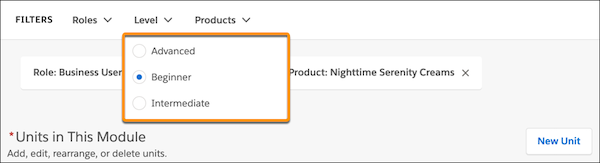
            <td data-label="Category" class="slds-cell-wrap" style="vertical-align:top;" headers="d3437e112 ">Levels</td>

            <td data-label="Available Default Filters" class="slds-cell-wrap" style="vertical-align:top;" headers="d3437e115 ">
              <ul>
                <li>Beginner</li>

                <li>Intermediate</li>

                <li>Advanced</li>

              </ul>
            </td>

          </tr>
          <tr class="">
            <td data-label="Category" class="slds-cell-wrap" style="vertical-align:top;" headers="d3437e112 ">Products</td>

            <td data-label="Available Default Filters" class="slds-cell-wrap" style="vertical-align:top;" headers="d3437e115 ">
              <ul>
                <li>General</li>

                <li>Salesforce products, such as Agentforce Sales (formerly Sales Cloud) </li>
              </ul>
            </td>

          </tr>
        </tbody>
      </table>

![Levels picklist in Trailmaker Content, showing the available values](https://sf-zdocs-cdn-prod.zoominsoftware.com/tdta-sales-mytrailhead-264-0-0-production-enus/0d6bc03d-58c7-47e8-89c9-5e00c98b5485/mytrailhead/images/tm_content_levels_picklist.png)

![Note](https://sf-zdocs-cdn-prod.zoominsoftware.com/tdta-sales-mytrailhead-264-0-0-production-enus/0d6bc03d-58c7-47e8-89c9-5e00c98b5485/images/icon_note.png)

Note If your learning content has nothing to do with Salesforce products, you can delete those filters for the Products category.

![Tip](https://sf-zdocs-cdn-prod.zoominsoftware.com/tdta-sales-mytrailhead-264-0-0-production-enus/0d6bc03d-58c7-47e8-89c9-5e00c98b5485/images/icon_tip.png)

Tip You can also create custom filter values for Roles, Levels, and Products categories. See [Add a Custom Filter for Enablement Site Content](https://help.salesforce.com/s/articleView?id=sales.mth_add_filter_to_products_category.htm&release=264.0.0&type=5 "You can add custom filters for the Roles, Levels, and Products content categories that you apply to trails and modules. Making these changes can require different users to collaborate, such as an admins, content creators, and release managers.").

## For Units

A unit doesn’t support filters, but instead specifies the number of points that a learner can earn after completing the unit’s assessment.

## Tags Compatibility

Trails, modules, and units previously supported the Tags category, which defined the business skills that applied to the content. Effective September 2021, the Tags category isn’t supported for any content type.

- For new content that you publish after September 2021, Trailmaker applies all the unit’s points to the General tag. This assignment is automatic, happens in the background, and ensures compatibility with other systems. But, you can’t modify this assignment.
- For existing content that was published before September 2021, any previously available Tags filters applied to that content are retained in the content’s backpack. But, Trailmaker Content no longer shows the applied Tags filters when you edit trails, modules, or units. You can still modify the points associated with an existing unit, but when you save your changes, Trailmaker automatically applies all the new points to the General tag. If you don’t modify a unit’s points, the points remain applied to the previously specified filters.
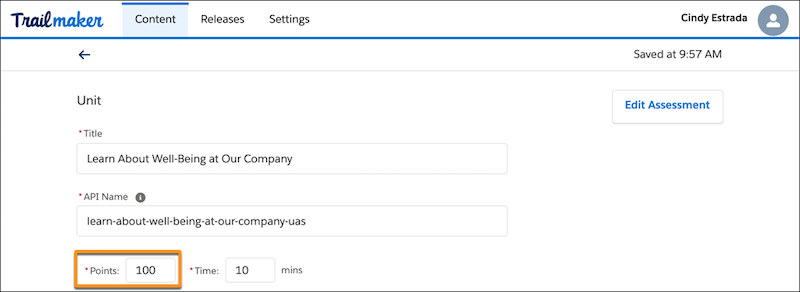
![Points field when editing a unit in Trailmaker Content.](https://sf-zdocs-cdn-prod.zoominsoftware.com/tdta-sales-mytrailhead-264-0-0-production-enus/0d6bc03d-58c7-47e8-89c9-5e00c98b5485/mytrailhead/images/tm_content_unit_points.png)

![Note](https://sf-zdocs-cdn-prod.zoominsoftware.com/tdta-sales-mytrailhead-264-0-0-production-enus/0d6bc03d-58c7-47e8-89c9-5e00c98b5485/images/icon_note.png)

Note In the Trailhead GO mobile app, the Tags category was called Skills.