---
schema_version: "1"
id: fc751456a526b9e0aecfc93415525ae4cf73d79869647f99044b8b20c108ead8
title: Choose Which Sales Reps Can Send Non-Commercial Email
collection: admin
version: current
locale: en-us
portal_url: https://docs.salesforce.com/admin/current/en-us/sales/264-0-0/emailadmin_non-commercial_rep.md
canonical_url: https://help.salesforce.com/s/articleView?id=sales.emailadmin_non-commercial_rep.htm&release=264.0.0&type=5
source_site: help.salesforce.com
content_type: documentation
content_hash: eac182fd46a051444cc38d45112c02f50c08ef0c27fc224772078f04b3cf68b2
description: Sometimes you have relevant information to email to customers even when they’ve chosen not to receive any commercial emails from your company. For example, for non-commercial email such as shipping information, updated billing balances, or a warning to let them know their contract is expiring. Manage which sales reps can send non-commercial emails to these customers.
products:
- Sales Cloud
- Cross Cloud
- Service Cloud Voice
release: "264"
---
# Choose Which Sales Reps Can Send Non-Commercial Email
Sometimes you have relevant information to email to customers even when they’ve chosen not to receive any commercial emails from your company. For example, for non-commercial email such as shipping information, updated billing balances, or a warning to let them know their contract is expiring. Manage which sales reps can send non-commercial emails to these customers.
### Required Editions
Available in Lightning Experience and Salesforce Classic in: Essentials, Professional, Enterprise, Performance, Unlimited, and Developer Editions
User Permissions Needed
To change the setting for sending non-commercial email:
Customize Application
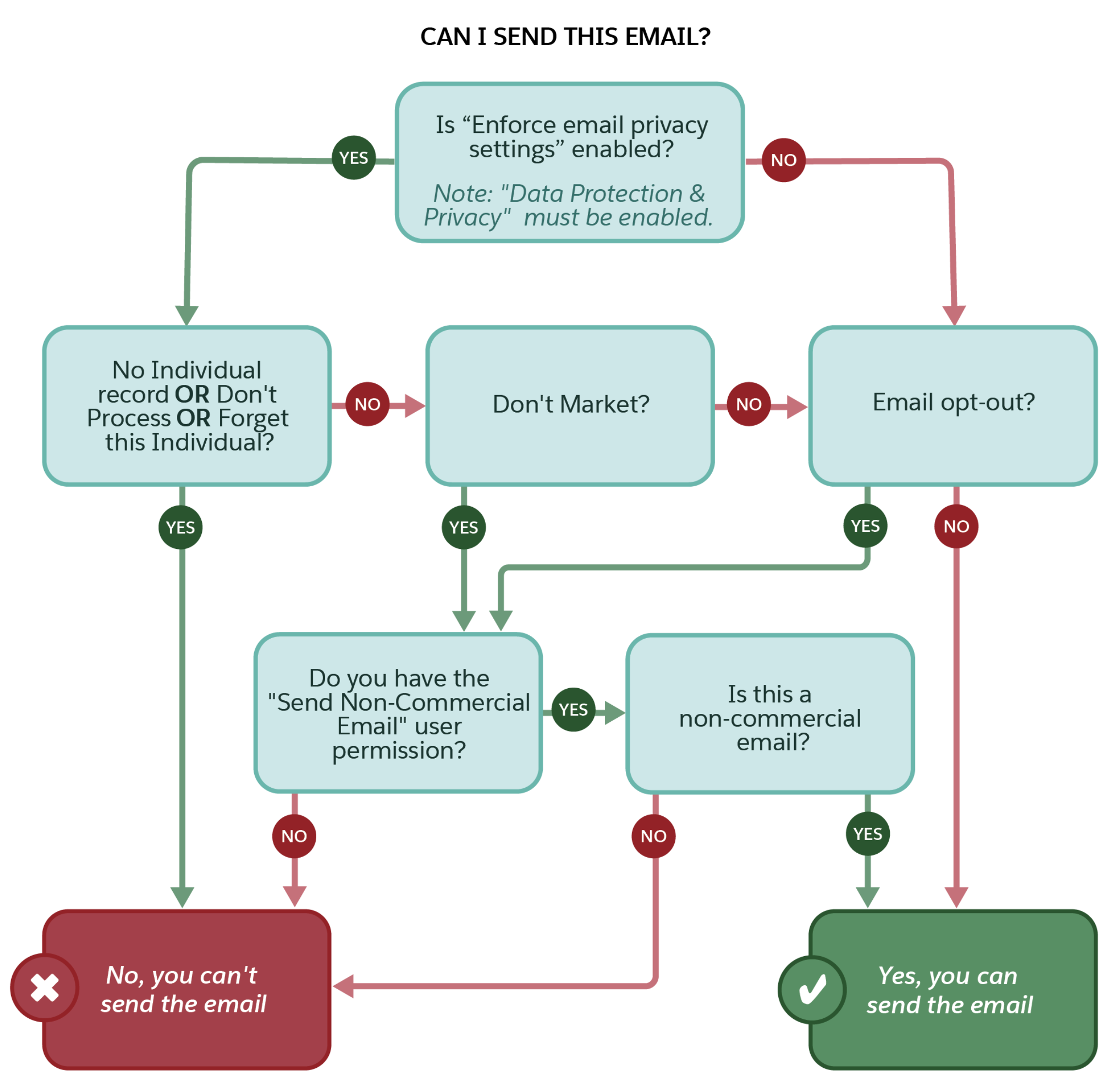
You must have the Email Opt Out field or Email Privacy enabled for this setting to take effect.

Note The **Send Non-Commercial Email** permission is on by default for all standard profiles that send email, and for custom profiles created in the Winter ‘19 release and later.
To prevent reps from sending email to customers who have the Email Opt Out or Don’t Market privacy settings, disable Send Non-Commercial Email in their profiles. Also make sure that the setting is disabled in any permission set assigned to the rep.
1. From Setup, enter Permission Sets in the Quick Find box, and select **Permission Sets**.
2. Clone an existing permission set, click the name to edit it, and select **System Permissions**.
3. Deselect **Send Non-Commercial Email**.
4. Assign to this permission set to reps who you don’t want to send non-commercial emails.
For customers that have selected Don’t Market in the Individual record, only reps with the Send Non-Commercial Email permission can send them an email.
The Send Non-Commercial Email user permission applies to regular, 1:1 emails only.

Important
In the Outlook and Gmail integrations, sales reps see messaging regarding a contact or lead’s email privacy preferences. However, the Send Non-Commercial Email permission isn’t enforced. It’s the sales reps responsibility to respect an email recipient’s privacy when sending emails from Outlook or Gmail.
#### See Also
- [Considerations for Email Privacy Preferences in the Outlook and Gmail Integrations](https://help.salesforce.com/s/articleView?id=sales.email_int_email_privacy.htm&release=264.0.0&type=5 "Your prospect’s and customer’s email privacy is important. Help to ensure that their email restrictions and privacy are respected when sales reps send emails from the Outlook and Gmail integrations.")