---
schema_version: "1"
id: 166e9b418277330d6efbfeec58564f895020f068fb05dcc557e86a3becfb6806
title: Enable Folders and Enhanced Sharing for Email Templates
collection: admin
version: current
locale: en-us
portal_url: https://docs.salesforce.com/admin/current/en-us/sales/264-0-0/email_templates_enable_enhanced_folders_sharing.md
canonical_url: https://help.salesforce.com/s/articleView?id=sales.email_templates_enable_enhanced_folders_sharing.htm&release=264.0.0&type=5
source_site: help.salesforce.com
content_type: documentation
content_hash: 21416a6a72541c015fe5ad8458a9e654817583d196e8efedb6b4844b60fec88f
description: To let users create folders, enable this setting.
products:
- Sales Cloud
- Cross Cloud
- Service Cloud Voice
release: "264"
---
# Enable Folders and Enhanced Sharing for Email Templates
To let users create folders, enable this setting.
### Required Editions
Available in: Lightning Experience
Available in: Professional, Enterprise, Performance, Unlimited, and Developer Editions
User Permissions Needed
To update settings:
Customize Application
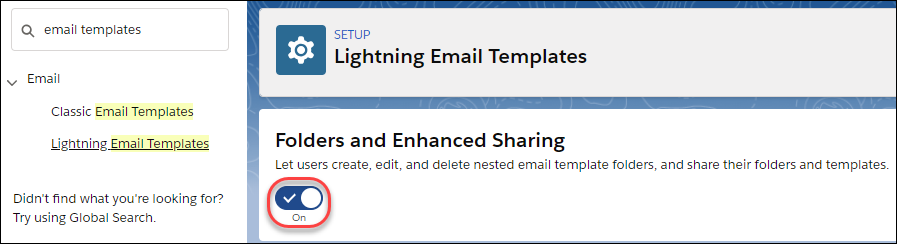
1. From Setup, enter Email Templates in the Quick Find box, then select **Lightning Email Templates**.
2. Enable Folders and Enhanced Sharing.
To let other users create folders, assign them the Create Folders for Lightning Email Templates permission.

Note If you disable **Folders and Enhanced Sharing for Lightning Email Templates**, your reps lose access to the email template folders they created and the email templates inside those folders. To give your reps access again, enable **Folders and Enhanced Sharing for Lightning Email Templates**.
#### See Also
- [Select Which Users Can Create and Share Email Template Folders](https://help.salesforce.com/s/articleView?id=sales.template_select_users_folder_create_share.htm&release=264.0.0&type=5 "Admins and any users with the Modify All Data permission can create email template folders. To let other users create email template folders, give them the Create Folders for Lightning Email Templates permission.")
- [Considerations for Email Template Folders and Sharing](https://help.salesforce.com/s/articleView?id=sales.template_folder_create_share_considerations.htm&release=264.0.0&type=5 "As you manage and share email templates and their folders, keep these considerations in mind.")