---
schema_version: "1"
id: 0ec1265d5e59abf5759474a290107f07c60705edbb70bf938e9648a73c64bd62
title: Check the Match Rates for a Data Service
collection: admin
version: current
locale: en-us
portal_url: https://docs.salesforce.com/admin/current/en-us/sales/264-0-0/data_dot_com_clean_admin_clean_vitals.md
canonical_url: https://help.salesforce.com/s/articleView?id=sales.data_dot_com_clean_admin_clean_vitals.htm&release=264.0.0&type=5
source_site: help.salesforce.com
content_type: documentation
content_hash: f875f258634af179348b227a1a5c6591442e9698698a7509fb9fe112c6fa8b14
description: Monitor the percentage of your records that data integration rules have matched to a record in data services. When records are matched, the data service can update them.
products:
- Sales
- Sales Enablement
release: "264"
---
# Check the Match Rates for a Data Service
Monitor the percentage of your records that data integration rules have matched to a record in data services. When records are matched, the data service can update them.
### Required Editions
Available in: Professional, Enterprise, Performance, and Unlimited Editions
User Permissions Needed
To check match rates:
Customize Application
1. In Setup, use the Quick Find box to find **Data Integration Metrics**.
2. 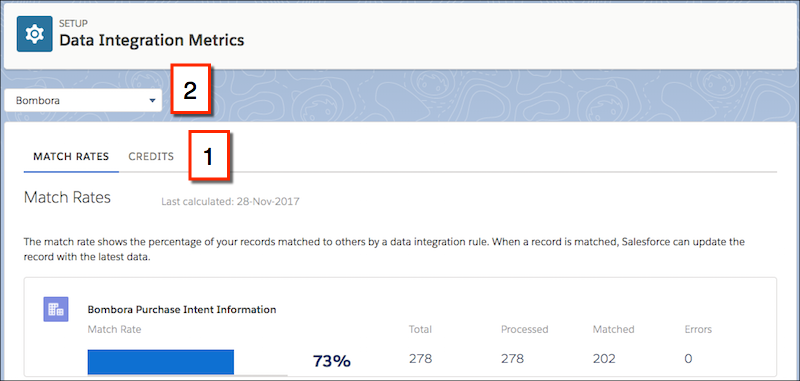
On the Match Rates tab (1), select a data service from the dropdown menu (2).
Match rates are displayed 24 hours after you activate a rule. After that, match rates are aggregated and updated nightly.
The Errors column shows the number of errors that occurred when the rule ran. An error occurs if a trigger, workflow rule, duplicate rule, or validation rule prevents a record from being updated. To download a file that includes the ID of each record with an error and the associated error message, click the number of errors. Only the most recent error for a record is available. The Errors column includes a maximum of 10,000 errors per data integration rule.