---
schema_version: "1"
id: 8bcaf7834872ae87bac2b76bd695e13fca50a6ab25b39578352aa7fda2970269
title: View and Convert Leads on an Account
collection: admin
version: current
locale: en-us
portal_url: https://docs.salesforce.com/admin/current/en-us/sales/264-0-0/accounts_matched_leads_view.md
canonical_url: https://help.salesforce.com/s/articleView?id=sales.accounts_matched_leads_view.htm&release=264.0.0&type=5
source_site: help.salesforce.com
content_type: documentation
content_hash: b2828000a26275732b0dc1258757e1d8c511e0761ce94ea90261b37f294bf9cd
description: Accounts show leads matched to a business account, with the best matches first. Convert leads without leaving the account.
products:
  - Sales Cloud
release: "264"
---
# View and Convert Leads on an Account

Accounts show leads matched to a business account, with the best matches first. Convert leads without leaving the account.

### Required Editions

<table class="slds-table slds-table_bordered slds-max-medium-table_stacked slds-m-bottom_small edition"><colgroup><col></colgroup><tbody><tr class=""><td class="slds-cell-wrap" style="vertical-align:top;">Available in: <strong>Essentials</strong>, <strong>Professional</strong>, <strong>Enterprise</strong>, <strong>Performance</strong>, and <strong>Unlimited</strong> Editions</td></tr></tbody></table>

<table class="slds-table slds-table_bordered slds-max-medium-table_stacked slds-m-bottom_small permission">
        <colgroup>
          <col style="width:50%">
          <col style="width:50%">
        </colgroup>
        <thead class="slds-text-title_caps ">
          <tr class="">
            <th scope="colgroup" class="slds-cell-wrap" colspan="2" style="text-align:center;vertical-align:top;" id="d77183e69">User Permissions Needed</th>
          </tr>
        </thead>
        <tbody>
          <tr class="">
            <td data-label="User Permissions Needed" class="slds-cell-wrap" style="vertical-align:top;" headers="d77183e69 ">To view leads:</td>

            <td class="slds-cell-wrap" style="vertical-align:top;" headers="d77183e69 ">View on Leads</td>

          </tr>
          <tr class="">
            <td data-label="User Permissions Needed" class="slds-cell-wrap" style="vertical-align:top;" headers="d77183e69 ">To edit or convert leads:</td>

            <td class="slds-cell-wrap" style="vertical-align:top;" headers="d77183e69 ">Edit on Leads</td>

          </tr>
        </tbody>
      </table>

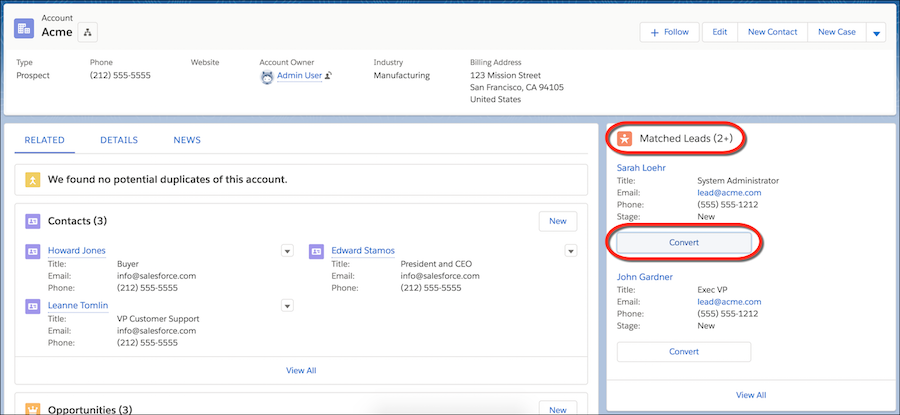
A standard matching rule for leads on accounts populates the Matched Leads component.

![Example](https://sf-zdocs-cdn-prod.zoominsoftware.com/tdta-sales-sales_core-264-0-0-production-enus/3c339c40-ca6c-49ba-9c6e-684be7a55f80/images/icon_example.png)

Example

![Account detail page with matched leads component showing two leads, and View All link for more](https://sf-zdocs-cdn-prod.zoominsoftware.com/tdta-sales-sales_core-264-0-0-production-enus/3c339c40-ca6c-49ba-9c6e-684be7a55f80/sales_core/images/accounts/accounts_matched_leads_component.png)

#### See Also

- [Standard Matching Rule for Leads on Accounts](https://help.salesforce.com/s/articleView?id=sales.matching_rules_standard_leads_on_accounts_rule.htm&type=5&language=en_US)
- [Account Engagement Pricing](https://www.salesforce.com/products/b2b-marketing-automation/?redirect=pardot.com)