---
schema_version: "1"
id: 440c79d9041aa1a2b6f9f126547c413bcef8b93eb62f6c29dfeb8a37db274c43
title: Turn On the Account Intelligence View
collection: admin
version: current
locale: en-us
portal_url: https://docs.salesforce.com/admin/current/en-us/sales/264-0-0/account_intelligence_view_set_up.md
canonical_url: https://help.salesforce.com/s/articleView?id=sales.account_intelligence_view_set_up.htm&release=264.0.0&type=5
source_site: help.salesforce.com
content_type: documentation
content_hash: 36aebfb2071f304ce44912b56864942af604a33addc860ad45fef4ee925358c7
description: To view account activities, see vital account metrics, and access related records in one dedicated workspace, turn on the Account Intelligence view.
products:
- Sales Cloud
release: "264"
---
# Turn On the Account Intelligence View
To view account activities, see vital account metrics, and access related records in one dedicated workspace, turn on the Account Intelligence view.
### Required Editions
Available in: Lightning Experience
Available with Sales in: Professional, Enterprise, Performance, and Unlimited Editions
User Permissions Needed
To set up accounts:
Modify Application

Tip Check out this feature in Salesforce Go! Find a guided setup experience, explore more content, discover related features, and monitor feature usage. See [Discover and Set Up Features With Salesforce Go](https://help.salesforce.com/s/articleView?id=xcloud.setup_salesforce_go.htm&type=5&language=en_US).
The Account Intelligence view is the default view for most users. To see the Account Intelligence view, click **Intelligence View** from the Account list view page. To return to the Account list view, click **List View**. If you don’t see the Account Intelligence view, your Salesforce admin can turn it on by using these steps.
1. From Setup, in the Quick Find box, enter Account Intelligence View, and then select **Account Intelligence View Setup**.
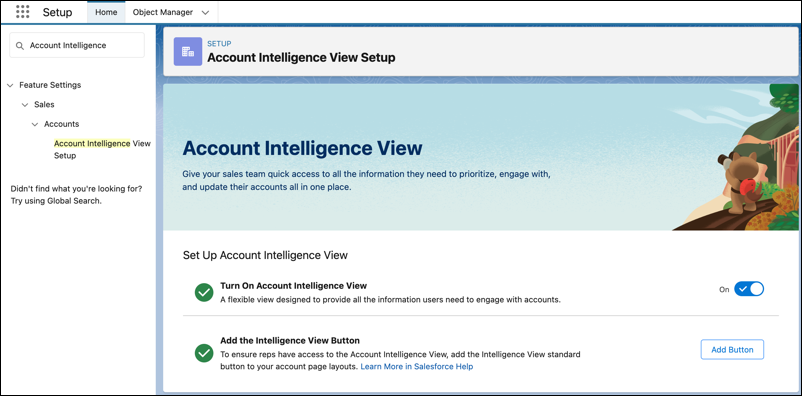
2. Turn on Account Intelligence View.
3. Add the Intelligence View button to your Accounts List View button layout.
1. Click **Add Button**
2. Select **Intelligence View**
3. Save your changes
Optionally, select the opportunity fields users can apply when customizing their Account Intelligence metrics. The default value is Amount.
To get the most out of the Account Intelligence View, turn on Einstein Activity Capture.
#### See Also
- [Set Up Einstein Activity Capture](https://help.salesforce.com/s/articleView?id=sales.aac_setup_parent.htm&type=5&language=en_US)
- [Turn On Activity Metrics](https://help.salesforce.com/s/articleView?id=sales.aac_activity_metrics_enable.htm&type=5&language=en_US)
- [Get Started With Activity 360 Reports](https://help.salesforce.com/s/articleView?id=sales.einstein_sales_activity_reporting_quick_start.htm&type=5&language=en_US)