
Select an organization-wide email address to use as the From address when Salesforce sends email for users with an unverified email domain. With this option, outgoing email uses a From address that reflects your company’s brand.
Where: This change applies to Lightning Experience and Salesforce Classic in all editions except Salesforce Free Suite and Database.com.
When: This feature was first released in late Summer ’26.
Why: The Substitute Email Address on the Deliverability page defines your org-wide substitute email address for unverified email domains. For each Experience Cloud site, you can specify a different From address for email sent on behalf of site users with an unverified email domain. See Send Site Emails from a Verified Address with Email Domain Substitution.
How: From Setup, in the Quick Find box, enter Deliverability, and then select Deliverability. Select Use a substitute email address for unverified domains, and then for Substitute Email Address, select an organization-wide email address.
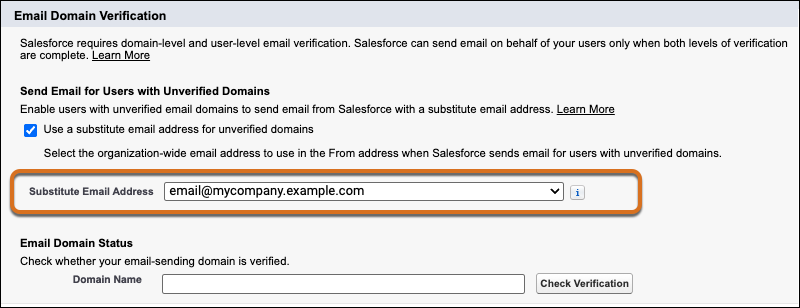
Only organization-wide email addresses that meet all of these conditions appear in the list. The email domain is verified, the email address is verified, and “Allow All Profiles to Use this From Address” is enabled.
If you don’t select a substitute address, Salesforce sends email for those users from
email@UniqueId.sfcustomeremail.com, where
UniqueId is your Experience Cloud site ID or org ID.