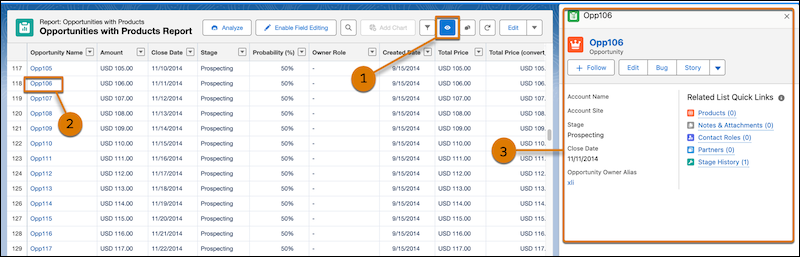
Review report records faster without leaving Lightning reports or opening multiple tabs. With record preview in Lightning reports, you can view record details in a side panel while keeping your report filters, columns, and record list visible. For example, sales reps can review opportunities from a pipeline report while preparing for customer calls and quickly move between records without losing their place.
Where: This change applies to Lightning Experience in Enterprise, Performance, Unlimited, and Developer editions.

How: From Setup, in the Quick Find box, enter Reports and select Reports and Dashboards Settings. Then, select Show record previews on Lightning Reports (Beta).
In report view mode, to open record links as a preview, click the eye  icon (1). Click a record link (2) to open the record in preview mode (3).