
Send promotional, transactional, or relational emails to your Contact and Lead lists without the extra processing step it used to require. Previously, sending emails from lists required creating a Data 360 segment, which introduced delays and occasional failed sends. The redesigned List Sends experience also brings the initial message configuration and audience selection steps into a single page. Design your message without clicking through separate pages or losing your place.
Where: This change applies to Salesforce Enterprise and Unlimited editions with:
- Marketing Cloud Next Growth and Advanced editions with the Salesforce Foundations add-on
- Marketing Cloud Account Engagement Growth, Plus, Advanced, or Premium editions with the Salesforce Foundations add-on
- Any Marketing Cloud Engagement+ edition with the Salesforce Foundations add-on
When: This feature is available starting mid-August.
Why: With the redesigned List Sends experience, you can:
- Skip segment creation entirely with Actionable Lists, which process your audience directly from your Contact or Lead list instead of requiring a Data 360 segment.
- Get emails out faster on time-sensitive campaigns. List-based sends no longer require segment processing, which can delay delivery or cause failed sends.
- Configure your message on one page instead of clicking through separate modal pages. Audience, message type, and save location are all visible together, so it's easy to see what's done and what's left.
How: From the Marketing app, access Leads or Contacts and apply a filter to select your intended recipients. Click Send Email to start the workflow.
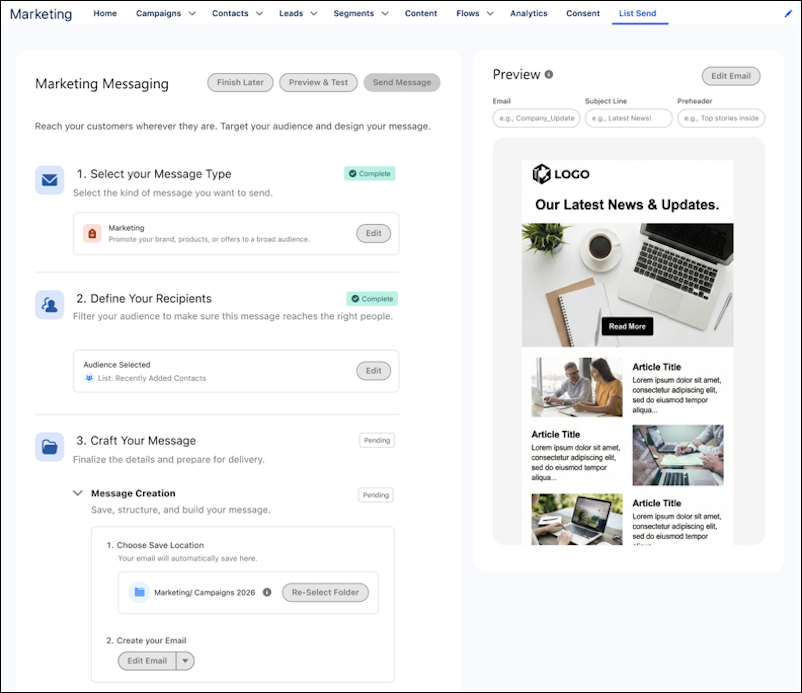
In Free Suite, emails go out immediately. Starter Suite, Pro Suite, Foundations, and Marketing Cloud editions add the option to schedule sends for later.
In Free Suite, Starter Suite, Pro Suite, and Foundations, access List Sends from Marketing Home. In Marketing Cloud editions, access List Sends from the Contacts or Leads list view.