Help IT service teams investigate Splunk-detected infrastructure issues with up-to-date server and cloud data in CMDB. Dynamic Discovery combines scheduled inventory updates with operational events so configuration items reflect current conditions. Admins can review incomplete CIs discovered from Splunk and add relevant resources to CMDB.
Where: This change applies to Lightning Experience in Enterprise, Performance, and Unlimited editions with Agentforce IT Service where Salesforce CMDB & Service Graph and Asset Discovery are enabled. The CMDB Enterprise add-on is also required.
Who: To configure Dynamic Discovery and create targets, users must have the IT Service Asset Discovery permission set group
Why: Dynamic Discovery connects Splunk alerts to CMDB records so IT teams can investigate infrastructure issues with the affected CI context. Combining operational events with CMDB data reduces the manual effort of correlating alerts with server and cloud inventory. Reviewing incomplete CIs helps admins identify relevant resources to add to CMDB and maintain complete inventory data.
How: In Setup, search and select Salesforce Go. Search and select for Splunk CMDB Integration Solution and then select Set Up. Click Get Started. Validate whether you have configured the Salesforce Go setup for CMDB and Discovery, and then click Install. In Take the Next Steps, find Turn On Splunk Integration and select Go to Feature Page. On the Discovery feature page, expand Set Up the Basics and turn on Enable Dynamic Discovery. In Automate Device Discovery and Synchronization, turn on Integrate Splunk for Comprehensive Asset Visibility.
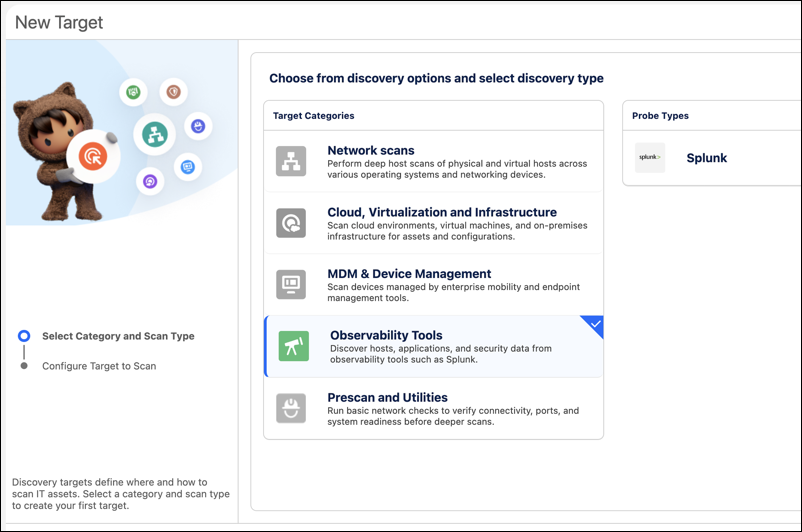
Next, expand Discovery & Scanning in the navigation panel, and select Targets. Create a new target by selecting Observability Tools as the target category and Splunk as the Probe Type.
After discovery begins, in the CMDB and Service Graph app, expand Dynamic Discovery in the navigation panel, and select Discovered CI by Source. Review incomplete CIs discovered from your sources and add relevant resources to CMDB.