Bring consistency and control to grant evaluation workflows. Create reusable Action Plan Templates to standardize multi-stage reviews, and enable Compliant Data Sharing to restrict reviewers to only the sections relevant to their expertise. Previously, application evaluations required manual reviews at every grant cycle, creating fragmented review experience that introduced delays and the risk of reviewer bias.
Where: This change applies to Lightning Experience in Enterprise, Unlimited, and Developer editions for Nonprofit Cloud and Agentforce Public Sector customers with Grantmaking.
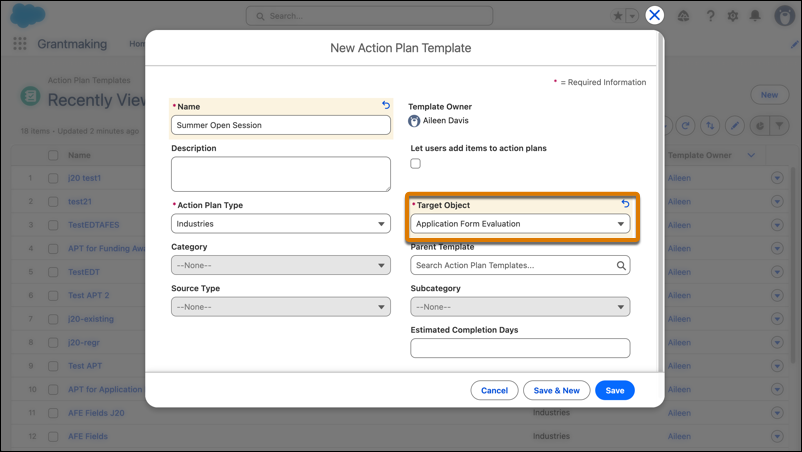
How: To create an Action Plan Template for evaluations, from the App Launcher, find and select Action Plan Templates. Click New, select Application Form Evaluation as the target object, and then add evaluation sections as template items after you save the template.
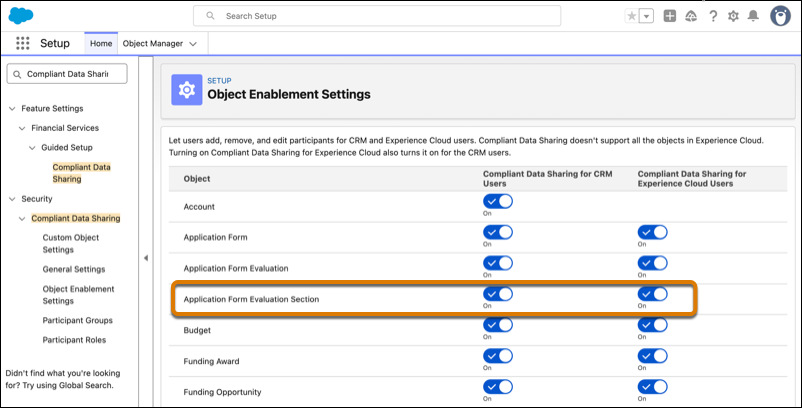
To enable granular section visibility, from Setup, in the Quick Find box, enter Compliant Data Sharing, and then enable it for the Application Form Evaluation Section entity.