
Perform Faster Drill-Downs with Dimensional Hierarchies in Data 360 Reports (Generally Available)
Use dimensional hierarchies in Data 360 reports to move between levels of detail without manually adding or removing individual fields. For example, analyze sales by product category, and then drill down into subcategories and individual products to identify what’s driving changes in performance. You can then roll up to higher-level groups to gain a broader view of performance trends and changes. This feature is now generally available.
Where: This change applies to Data 360 in Developer, Enterprise, Performance, and Unlimited editions.
How: In the report editor, add a hierarchy field from the Fields panel to the Columns or Group Rows section.
To drill down and display the next level in the hierarchy, click + next to the dimension hierarchy field, or select Drill Down from the column actions menu.
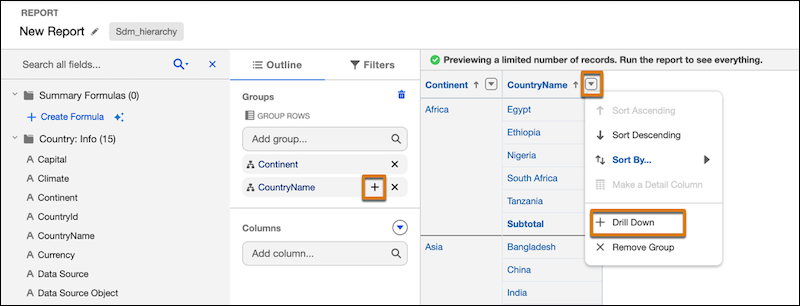
Similarly, to roll up to the top level of the hierarchy, click X next to the to the dimension hierarchy field or select Remove Group from the column actions menu.